

Useful vaporizer accessories match the exact device generation you own. Start with routine-wear parts your device consumes (oven screens, mouthpieces, seals), add the matching charger, then layer on convenience items like cleaning kits, dosing capsules, water-pipe adapters, cases, and grinders. This vaporizer accessories guide covers each accessory group, replacement parts versus convenience add-ons, charger and battery checks, and FAA air-travel rules for lithium-battery devices [1] [2].
Which Vaporizer Accessories Are Useful for Everyday Use?
Dry herb vape accessories fall into a small number of practical groups, and once you know the groups, shopping gets easier. The largest group is routine-wear parts such as oven screens, oven lids, and mouthpieces. These touch material or vapor the most, so they are the pieces that need to be swapped out first. The second group is upkeep supplies, including maintenance kits and cleaning tools that keep the device working the way it did on day one. The third group is loading and storage tools, including dosing capsules and cases. The fourth is charging accessories, which cover model-specific docks, USB-C cables, and wall chargers. The fifth is connection accessories, such as water-pipe adapters that let the device attach to compatible glass.
Manufacturer catalogs are organized around these groups, and the catalog is the cleanest place to confirm that a part is meant for your exact device [1]. Generic listings from third parties often reuse the same part name for very different devices, which is why starting with the official catalog or product page saves time. The Treehouse Lifestyle Vaporizers and Accessories pages show which parts match which device families, and the free shipping on orders $150+ makes it easy to bundle the essentials [2].
Battery care is part of everyday use too. Most modern vaporizers use lithium-ion cells, and a model-fit charging dock or a quality USB-C setup is the simplest way to keep the battery healthy. The guide on How Do You Care for a Vaporizer Battery Without Ruining It? covers the same ground in more detail.
- Routine-wear parts: oven screens, oven lids, and mouthpieces that need to be replaced first
- Upkeep supplies: maintenance kits and cleaning tools that keep the device working as designed
- Loading and storage tools: dosing capsules, storage tins, and protective cases
- Charging accessories: model-specific docks, USB-C cables, and wall chargers
- Connection accessories: water-pipe adapters and similar add-ons that change how the device connects to other compatible items
Which Replacement Parts Should I Keep on Hand for a Dry Herb Vaporizer?
The parts that wear out fastest are the ones that touch material or vapor the most, so they should be the first things you stock. Oven screens sit between the chamber and the vapor path, collecting fine particles over time. Mouthpieces see the most contact during use, and the silicone or rubber seals around them lose shape with regular cleaning. Oven lids, where present, take repeated removal and replacement. Having a spare of each means you can swap in a clean part while the used one dries, which keeps the device ready to go.
Charging accessories should be on hand too, because a worn cable or a missing wall adapter is the fastest way to find yourself without a working device. The official catalog for major brands lists charging docks, USB-C wall chargers, and replacement cables that match specific device generations [2]. Storage tools such as cases and dosing capsules are also useful, especially when you travel with the device. The Treehouse Lifestyle guide on What Is a Vaporizer and How Does It Work? is a good starting point for how a dry herb vaporizer fits together, and the article on What Are the Parts of a Bong, Rig, or Pipe and How Do They Work? covers the connection-accessory side in more detail.
The Treehouse Lifestyle Replacement Parts subcategory is a useful shortcut for finding spare parts that match the vaporizers and accessories sold on the site. Confirm the exact model generation in the product title before you check out, since compatibility is the single biggest factor in whether a part will fit.
- Oven screens: the routine-wear filter screen that should be replaced on a regular schedule
- Oven lids: the replacement lid that sits on top of the oven and takes repeated handling
- Mouthpieces: a raised or standard replacement mouthpiece kept on hand for swap-in
- Charging accessories: the model-specific dock or USB-C wall charger that matches the device
- Maintenance kit: a small bundle of cleaning and upkeep supplies that covers daily care
- Grip sleeves: a model-fit protective sleeve that shields the body during everyday carry

How Do I Know Whether a Mouthpiece, Screen, Charger, or Adapter Fits My Vaporizer?
Accessory names are not universal across manufacturers, so the model-specific product listing or manual should control the purchase decision. Terms such as oven, chamber, screen, lid, stem, mouthpiece, cooling unit, capsule, and adapter mean different things on different devices [1]. Buying a part based on the generic name alone is the most common reason an accessory arrives and does not fit. A quick compatibility check before you pay fixes this.
A useful example is the difference between a standard mouthpiece and a raised mouthpiece for the same device. Both may be listed under the same product family, but only the matching generation will seat correctly. The same is true for chargers, where a USB-C cable out of a drawer may not match the wattage the device expects. Walking through a numbered checklist before you order keeps the guesswork out of the process.
If you are browsing a hot new device such as the Dynavap UniDyn – Ball Vape, the same rule applies: confirm the matching accessory family in the manufacturer catalog before you add the part to your cart. The free shipping on orders $150+ threshold makes it easier to bundle everything you need in one order, so you only have to run the check once.
- Confirm the exact device model and generation in the product title before you order any part
- Cross-check the part number or SKU on the official catalog page, not the generic listing
- Verify the cable and charger type (USB-C, micro-USB, dock) matches the device’s charging port
- Match the connection accessory (such as a water-pipe adapter) to the joint size on your glass
- Read the manual or the official FAQ for the exact words the manufacturer uses for each part
What Is the Difference Between a Convenience Accessory and a Replacement Part?
A replacement part restores or maintains an existing device function. A convenience accessory changes convenience, storage, loading, charging, or how the device connects to another compatible item. Screens, mouthpieces, seals, oven lids, and charging cables are replacement parts because the device can stop working properly without them. Dosing capsules, water-pipe adapters, cases, and grinders are convenience accessories because the device works perfectly well without them.
The distinction matters because the buying order should follow it. Stocking up on replacement parts first means you are never stuck waiting for a screen or a cable to arrive. Convenience accessories are the next layer, and they tend to be more fun to buy because they change how the device feels day to day. The guide on gift ideas for vaporizer users rounds up the kind of convenience add-ons that pair with a working setup What Are the Best Gift Ideas for Vaporizer Users?.
Manufacturer catalogs quietly make this distinction for you. The same catalog, for example, splits oven screens and oven lids (replacement parts) from raised mouthpieces, grip sleeves, and a water-pipe adapter (convenience accessories) [2]. Reading the catalog with replacement-versus-convenience in mind makes it easier to decide what to add to the cart on the first pass and what to leave for a later order.
- Replacement parts: oven screens, oven lids, mouthpieces, seals, and chargers that keep the device working
- Convenience accessories: dosing capsules, cases, grinders, and water-pipe adapters that change how the device is used
- Replacement parts ship first because a missing screen or cable can stop the device from working
- Convenience accessories ship second, based on how the device is actually used day to day
- The same catalog page may list both; the part name and description usually tell you which group it belongs to
| Factor | Replacement Part | Convenience Accessory |
|---|---|---|
| Job | Restores or maintains an existing device function | Changes convenience, loading, storage, or connection |
| Examples | Oven screens, oven lids, mouthpieces, seals, chargers | Dosing capsules, cases, grinders, water-pipe adapters |
| If missing | Device may stop working or perform poorly | Device still works as designed |
| Buying order | First batch with the device | Second batch as actual use demands |
| Catalog cue | Listed under wear parts or maintenance | Listed under add-ons or upgrades |
When Should Vaporizer Screens, Seals, Mouthpieces, and Cooling Parts Be Replaced?
Routine-wear parts build up residue over time even with regular cleaning, and a few clear signals tell you it is time to swap a part. A screen that looks clogged, a seal that no longer sits flat, or a mouthpiece that has lost its shape are all signs that a replacement is due. Cooling parts, such as a cooling unit, follow the same rule: if the cooling path looks worn or the part is hard to clean, replace it.
Manufacturer change intervals are a useful starting point. The device manual usually lists a recommended replacement schedule for screens, mouthpieces, and seals, and the official catalog will list the matching spare part for each one [2]. Following that schedule keeps the device working as designed and avoids the slow drift in performance that happens when a worn part is left in place too long.
A useful rule of thumb is to keep at least one spare of every routine-wear part on hand, so a swap is always quick. The free shipping on orders $150+ threshold makes it easy to bundle a full set of spares.
- Visible residue or clogging on a screen that does not come off with cleaning
- A seal or gasket that no longer sits flat or has lost its original shape
- A mouthpiece that has surface wear, discoloration, or a loose fit
- A cooling part that is hard to clean or shows wear on the connection points
- Any part that has reached the manufacturer-suggested replacement interval
What Should I Check Before Buying a Charger or Battery-Related Accessory?
Charging accessories are the part of the catalog where the wrong buy is the most expensive, because a bad match can shorten battery life or simply not work. Start by matching the charger to the device: the official catalog for major brands lists a model-specific charging dock and a USB-C wall charger that are designed for the exact device generation [2]. The match is usually printed on the product page and again on the back of the charging accessory.
Next, confirm the wattage and cable type. Most modern vaporizers charge over USB-C, but the wattage the device expects is different from what a generic phone charger can deliver. A model-specific USB-C wall charger removes the guesswork. Once the matching charger is in hand, the rest of the charging setup (cable length, dock placement) is a matter of preference rather than compatibility.
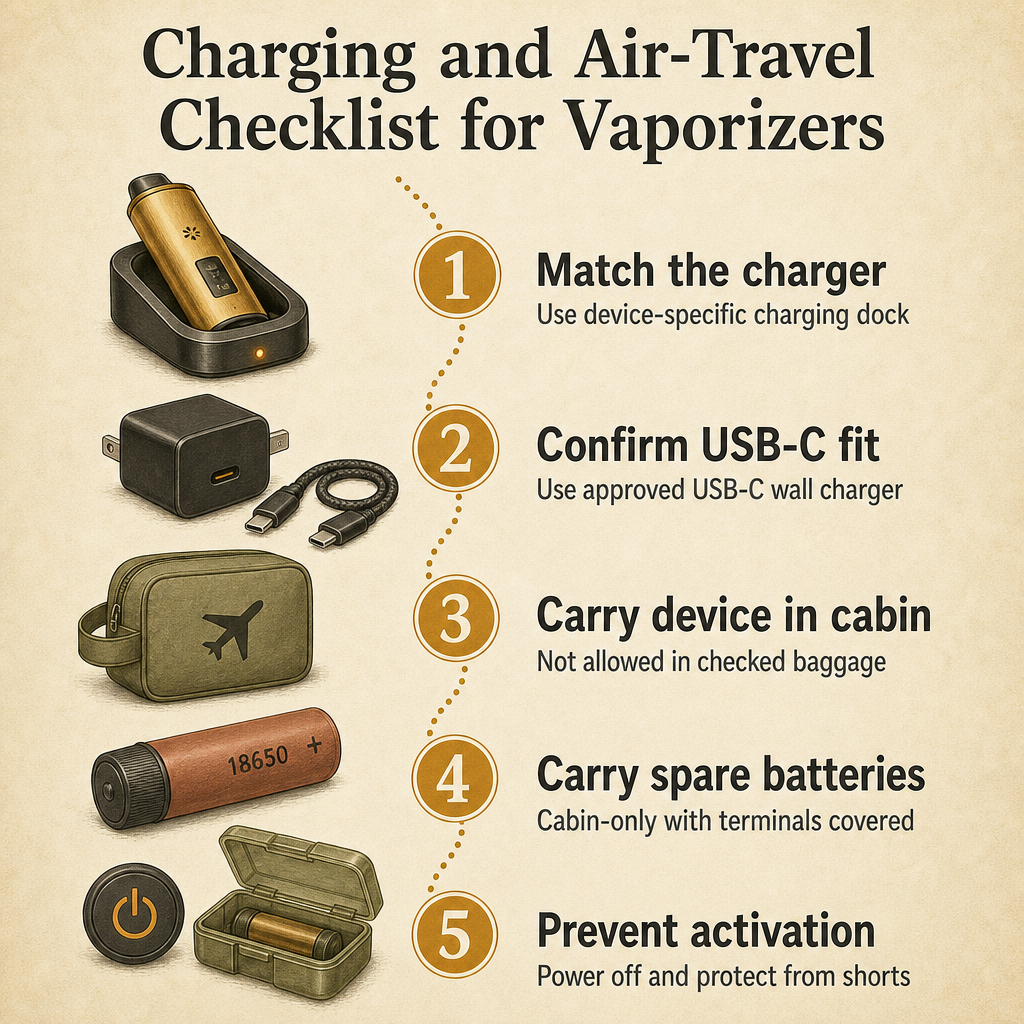
Air travel is the second half of the battery question. FAA lithium-battery guidance is clear that spare lithium batteries and electronic smoking devices are not allowed in checked baggage and must be carried in the passenger cabin, with steps taken to prevent accidental activation and short circuits [3]. The numbered checklist below covers both the buyer side and the traveler side in one pass.
- Match the charger to the exact device model and generation on the official catalog page
- Confirm the cable type (USB-C, micro-USB, or dock) and the wattage the device expects
- Use a quality USB-C wall charger from the manufacturer or a recognized accessory brand
- For travel, carry the device and any spare cells in the cabin, not in checked baggage
- Take steps to prevent accidental activation and short circuits during the trip
How Should a Vaporizer with a Lithium Battery Be Packed for Air Travel?
FAA guidance covers vaporizers and spare lithium batteries as a specific case, and the rules are consistent across major US carriers. Spare lithium batteries and electronic smoking devices are prohibited in checked baggage and must be carried in the passenger cabin, with measures taken to prevent accidental activation and short circuits [3]. The simplest way to follow the rule is to handle the device and any spare batteries as carry-on only.
Inside the carry-on, the device should be powered off, with any loose cells in a case or sleeve that covers the terminals. If the device uses a built-in battery, powering it down is the main step. If it uses a removable cell, the cell should be in a protective case, with the terminals covered so they cannot touch metal objects in the bag. The same logic applies to a charging dock or a USB-C wall charger, which are usually fine in the cabin but should be packed so the cable is not bending a connector.
The free shipping on orders $150+ threshold is useful for travel prep too, because it lets you stock up on a spare charging cable, a wall adapter, and any routine-wear parts before a trip. The device, the charger, and the spares all travel together in the cabin, and the right parts are already on hand when the destination arrives.
- Pack the vaporizer and any spare batteries in the carry-on, not in checked baggage
- Power the device off completely before placing it in the bag
- Cover the terminals of any spare cells with a case, sleeve, or tape to prevent shorts
- Keep the charging dock, USB-C cable, and wall adapter with the device in the cabin
- Avoid stacking spare batteries loose with metal objects such as keys or coins
What Is a Sensible Order for Buying Vaporizer Accessories?
The buying order that matches the way real vaporizers are used is short and easy to remember. First, secure the compatibility-critical wear parts your device actually consumes, so a cleaning cycle or a clogged screen never catches you off guard. Second, add the right charging equipment, because a working device without a working charger is still stuck on the counter. Third, layer on convenience accessories such as cleaning kits, storage tools, loading aids, and connection accessories, in whatever order matches the way you actually use the device.
The Treehouse Lifestyle Vaporizers and Accessories pages are a useful way to walk this order in practice, because both pages show the model-specific parts and the add-ons alongside each other. The free shipping on orders $150+ threshold also fits the sequence, since the first batch (wear parts plus a charger) usually clears the threshold comfortably. Later batches, which are mostly convenience add-ons, can be ordered as needed rather than all at once.
The same sequence lines up with manufacturer catalogs, which split the parts into the same groups: routine-wear parts and charging equipment up top, with convenience accessories and connection parts further down the page [1] [2]. Following the sequence makes the catalog easier to read and the cart easier to fill.
- Step 1: order the compatibility-critical wear parts (oven screens, oven lids, mouthpieces, seals)
- Step 2: order the matching charger and cable for the exact device generation
- Step 3: order a maintenance kit and any cleaning supplies that pair with the device
- Step 4: order storage tools such as cases and dosing capsules if you travel with the device
- Step 5: order connection accessories such as a water-pipe adapter once the rest of the kit is covered
Frequently Asked Questions
Which vaporizer accessories are worth buying first?
Start with the compatibility-critical routine-wear parts the device actually consumes, including oven screens, mouthpieces, and any seals, plus the manufacturer-recommended charging equipment. Only add convenience items like cleaning kits, dosing capsules, water-pipe adapters, cases, or grinders after those essentials are covered.
How do I check whether a screen, mouthpiece, or charger fits my vaporizer?
Use the manufacturer catalog that matches your exact device generation. Terms like oven, chamber, screen, lid, stem, mouthpiece, cooling unit, capsule, and adapter vary by brand, so the model-specific product listing or manual should control the purchase decision rather than the generic part name.
What is the difference between a replacement part and a convenience accessory?
A replacement part restores or maintains an existing device function (screens, mouthpieces, seals, oven lids, charging cables). A convenience accessory changes how the device is loaded, stored, cleaned, charged, or connected to another compatible item such as a water pipe.
Can I bring a vaporizer and spare batteries on a plane?
Per FAA lithium-battery guidance, spare lithium batteries and electronic smoking devices are prohibited in checked baggage and must be carried in the passenger cabin, with steps taken to prevent accidental activation and short circuits.
Are dosing capsules, water-pipe adapters, cases, grinders, and cleaning kits worth buying?
They are worth buying once the compatibility-critical wear parts and charging equipment are covered. Each one is a convenience add-on; they change loading, storage, cleaning, or how the device connects to another item, but they are not required to keep the device working day to day.
Which Vaporizer Accessories Should You Buy First, and Which Can Wait?
The accessory list for a dry herb vaporizer is shorter than it looks once you split it into two groups. Replacement parts (oven screens, oven lids, mouthpieces, seals, and the right charger) are the essentials that should go in the first order, because a missing screen or a wrong cable can stop the device from working at all. Convenience accessories (dosing capsules, cases, water-pipe adapters, grinders, and cleaning kits) are the second layer, and they are worth adding once the essentials are in hand.
Manufacturer catalogs are the cleanest way to verify compatibility, and they organize parts by product family rather than by generic name. FAA guidance, meanwhile, covers the air-travel side of owning a lithium-battery device, and the cabin-only rule for both the device and any spare batteries is the part to remember before a trip. With those two anchors in place, the rest of the buying order is a matter of how the device is actually used.
Treehouse Lifestyle stocks vaporizers and accessories from brands that publish their own catalog pages, and the Replacement Parts subcategory is a quick way to see which parts are in stock for each device. The free shipping on orders $150+ threshold also makes the first batch easier to put together, which is usually the batch that clears the threshold on its own.
Sources
- Arizer: Accessories – Arizer
- PAX: All PAX Accessories & Apparel
- Federal Aviation Administration: Lithium Battery Resources