

Choose an Arizer by your setup, power needs and controls. Air SE has presets; Air MAX adds precise controls and USB-C. Solo II MAX offers USB-C session use with an integrated battery. Solo III v2.0 adds on-demand mode. Extreme Q is a plug-in desktop with whip and balloon options. This guide compares documented features, not hands-on test results. [2] [3] [4] [5] [6]
Should you choose a portable Arizer or an Extreme Q desktop?
Will your Arizer move between rooms, or stay on a table near an outlet? Solo II, Solo II MAX, Solo III v2.0, Air MAX and Air SE use batteries. Extreme Q comes with a power adapter and separate desktop accessories. That difference shapes the full setup, not just charging. [1] [2] [3] [4] [5] [6]
A battery-powered model lets you plan around charging rather than keeping a cord connected during each use. You still need to think about the removable glass tube, where it will rest and how you will carry it. Portable does not mean there are no loose or breakable parts.
A desktop gives you a fixed place for the base, bowl and chosen accessories. With Extreme Q, allow space for the cord and either a whip or balloon arrangement. The base alone does not show how much room the complete setup needs.
These are dry-herb devices, not oil-cartridge pens or concentrate rigs. Arizer’s Air SE FAQ states that its products are intended for dry herbal materials, not liquids, oils or concentrates. A familiar brand name is not a reason to load a different material. [5]
When browsing Treehouse Lifestyle’s Vaporizers, separate your power and setup needs from your wish list of extra features. If you mainly want a tabletop device, a portable’s charging speed may matter less than the desktop’s parts and storage. If you need a device that moves between rooms, the opposite may be true.
- Battery-powered portable: plan for charging and a place to store the removable glass tube.
- Plug-in desktop: plan for outlet access and the full bowl, cord and accessory arrangement.
- Removable glass: check what comes in the kit and how you will carry or store it.
- Whip or balloons: choose the arrangement you want before comparing desktop packages.
- Storage space: consider all the parts you will put away, not just the base unit.
How do Arizer Solo II, Solo II MAX and Solo III v2.0 compare?
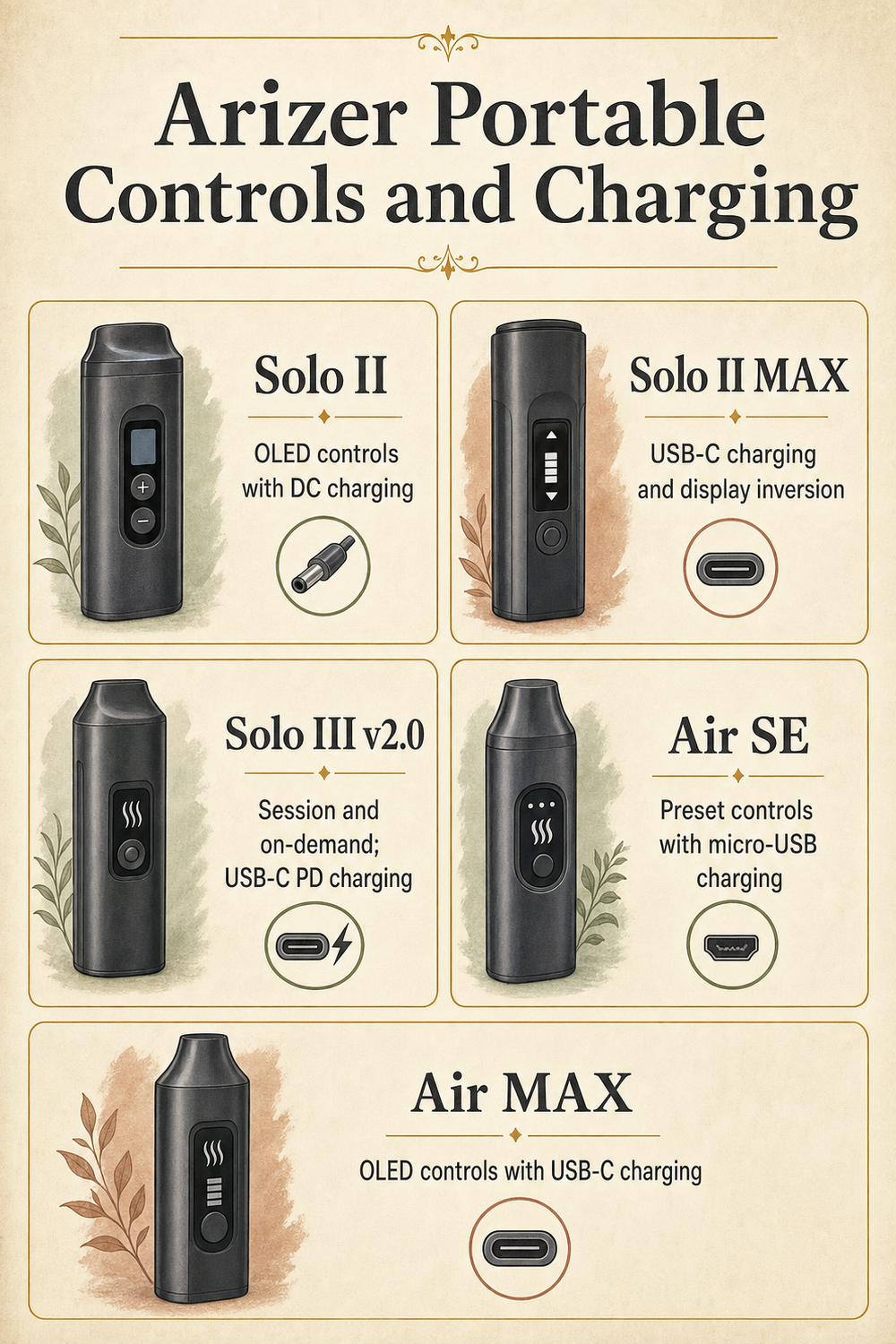
The Solo name covers distinct devices. Original Solo II uses an OLED screen with menu and arrow buttons. Its setpoint range is 50–220°C, with adjustments in one-degree and ten-degree steps. It uses DC charging rather than the USB-C system listed for Solo II MAX. These figures describe the controls; use the model manual for operating instructions. [1] [9]
Arizer estimates about three hours of operation per charge for original Solo II, depending on settings and use. It also states that the battery is not user-replaceable. Think about future service as part of ownership instead of assuming you can swap the battery yourself. [1]
Solo II MAX changes the charging connection to USB-C. Its listed charger is rated 5V/3A, and its kit includes a 110mm Glass Aroma Tube and a 14mm Frosted Glass Aroma Tube. Normal and dark display modes let you choose how the controls appear; the display and controls also invert when the device is turned upside down. [2]
Arizer states that Solo II MAX heats up in under 30 seconds and typically provides three hours of use per charge, depending on settings and usage. Its setpoint range is 50–220°C. Like original Solo II, its battery is not user-replaceable; Arizer offers replacement service. Those runtime and heat-up figures come from the manufacturer, not Treehouse testing. [2]
The current Solo III product page names the device Solo III v2.0. It lists session and on-demand modes, a large color display, programmable settings and USB-C PD charging. Arizer advertises a 5–15-second heat-up time and up to three hours of battery use. Do not attach those features or estimates to an older device simply because its listing says Solo. [3]
Glass compatibility also needs exact wording. Arizer says Solo III v2.0 accepts official standard Air/Solo Glass Aroma Tubes as well as its XL tubes. It describes the XL tubes as having double the capacity of the original tubes and increased airflow. This does not prove that XL tubes fit older Solo or Air devices. [3]
Still deciding whether a Solo belongs in your routine at all? Read Portable vs Desktop Vaporizer: Which Fits Your Routine? before comparing revisions. For basic device terms, start with What Is a Vaporizer and How Does It Work?; for a broader portable buying checklist, use How Do You Choose the Right Portable Vaporizer?. Those guides can help you decide which features you actually need rather than choosing by model number alone.
- Original Solo II: OLED controls, DC charging and a battery that is not user-replaceable.
- Solo II MAX: USB-C charging, normal and dark display modes, and automatic display/control inversion.
- Solo III v2.0: session and on-demand modes, a color display, programmable settings and USB-C PD charging.
- Solo III v2.0 glass: documented support for official standard Air/Solo tubes and XL tubes; do not assume reverse compatibility.
| Solo model | Controls and modes | Charging |
|---|---|---|
| Solo II | OLED screen; menu and arrow buttons | DC charging [1] [9] |
| Solo II MAX | Normal/dark display; automatic inversion | USB-C; listed 5V/3A charger [2] |
| Solo III v2.0 | Color display; session and on-demand modes | USB-C PD [3] |
What is the difference between Arizer Air SE and Air MAX?
Air SE uses five preset temperatures and LED icons instead of the Air MAX OLED screen. Arizer positions it for budget-oriented shoppers. Check current listings for prices: that positioning does not establish today’s price gap or prove the two models perform identically. [5]
Air MAX provides one-degree adjustment across a 50–220°C setpoint range. Its OLED display, dark mode and automatic display inversion let you choose more detailed settings and change how you view them. The main control choice is simple presets versus precise adjustment. [4]
Both models have interchangeable batteries, but they use different formats. Air SE uses an 18650 battery accessed through the rear cover. Air MAX uses a 26650 battery. The word interchangeable describes the battery within its supported device; it does not make the two models’ batteries interchangeable with each other. [4] [5]
Charging differs too. Air SE has micro-USB charging and includes a USB-A-to-micro-USB cord. Air MAX uses USB-C, with a listed 5V/2A charger. Do not assume a Solo II MAX charger and an Air MAX charger have identical specifications just because both use USB-C. Match the charging gear to the exact model’s instructions. [4] [5]
Arizer advertises up to 80 minutes of use per charge for Air SE. For Air MAX, it lists up to two and one-quarter hours, charging to up to 90% in two hours, and use-while-charging functionality. These are manufacturer figures, not promises for every setting or environment. [4] [5]
Air MAX’s less-than-60-second heat-up claim has stated conditions: a fully charged battery, 24°C ambient temperature and a 220°C setpoint. Keep those conditions attached when comparing it with another model. This is a source-based Arizer Air comparison, not a hands-on review. [4]
If your shortlist extends beyond Arizer, the Pax Four Vaporizer listing is another place to check an exact kit and model name. That link is not evidence that it shares Arizer’s battery, controls or glass system.
- Air SE controls: five temperature presets with LED icons.
- Air MAX controls: an OLED screen, one-degree adjustment, dark mode and automatic display inversion.
- Battery format: Air SE uses 18650; Air MAX uses 26650. Buy replacements for the exact model.
- Charging connection: Air SE uses micro-USB; Air MAX uses USB-C.
- Air SE glass kit: Arizer lists a 70mm Glass Aroma Tube, travel tube and stem cap. [5]
How does the Arizer Extreme Q work with a whip and balloons?
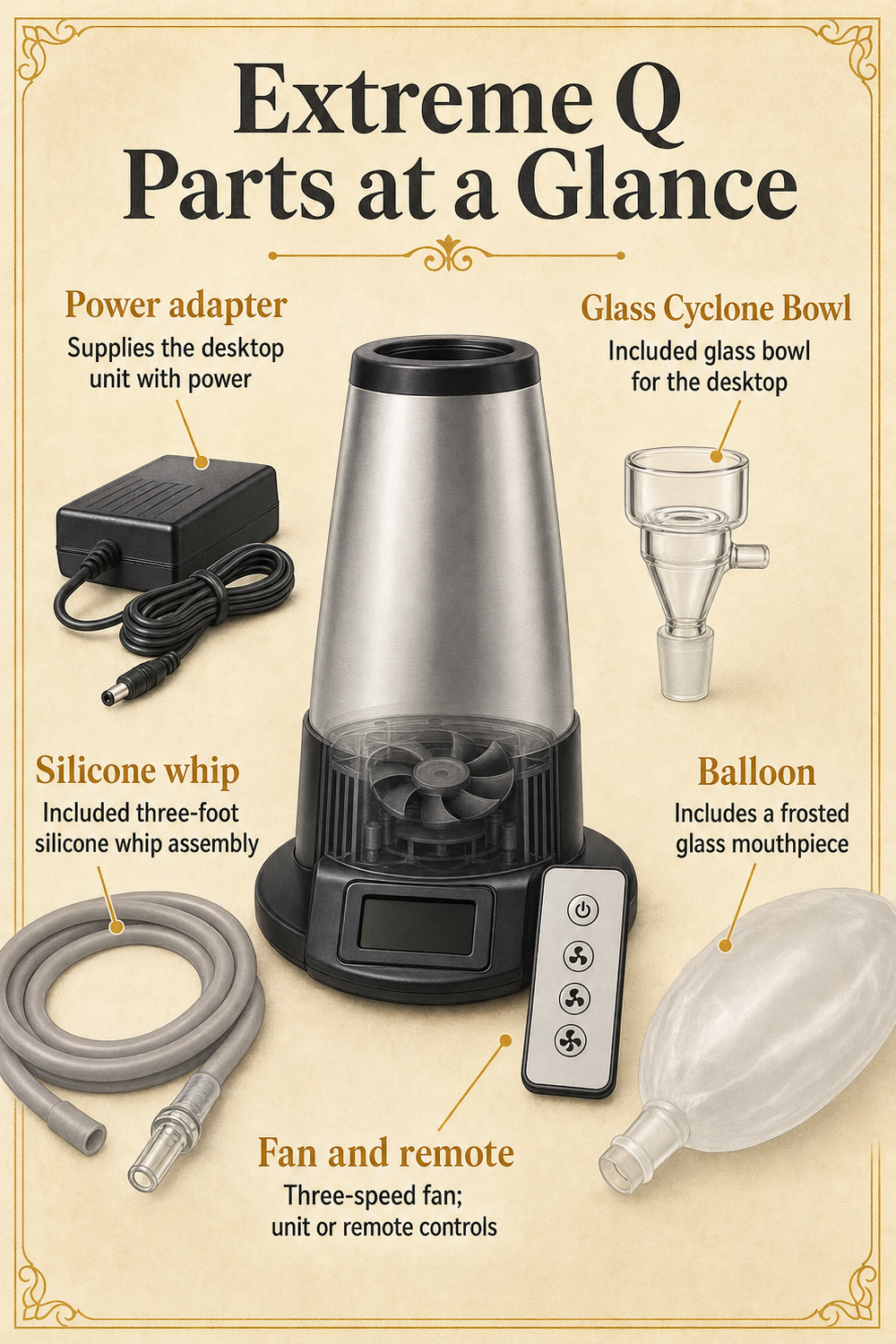
Extreme Q is a powered tabletop setup with two accessory arrangements. A whip is the tubing assembly used with the desktop; a balloon provides a collection bag with a mouthpiece. Choose based on which arrangement you prefer to handle and store. [6]
Arizer lists a Glass Cyclone Bowl, a three-foot silicone whip, an all-glass mini whip, a balloon with a frosted glass mouthpiece, a remote control and a power adapter. It also lists a three-speed fan controlled from the unit or remote. Identify these parts before following the model manual’s assembly and operating directions. [6]
Work through the component checklist below in order. It is a way to understand the kit, not a replacement for the official operating procedure. This guide does not assign balloon fill times, fan settings or a temperature sequence.
Extreme Q’s controls differ from the portable models. Its support page lists a 50–260°C setpoint range, one-degree Celsius adjustment, Celsius/Fahrenheit display and remote temperature controls. The upper end of that range is a device specification, not a recommended operating temperature. [6]
The base is listed at 442 grams without parts and 170mm high. Those figures leave out the cord, bowl, whip and balloon accessories. Measure the place where the complete setup will live rather than comparing the bare base with a portable device. [6]
The Arizer ExtremeQ Desktop Vaporizer listing lets you check the offered kit before checkout. Also consider XQ2 if you want to compare another Arizer desktop: its documented features include whip and balloon systems, a color display, programmable remote, Connoisseur Bowls and a replaceable air intake filter. Those additions belong to XQ2; do not read them into an Extreme Q listing. [7]
- Identify the powered base and power adapter, then choose a tabletop location with room for the full setup.
- Find the Glass Cyclone Bowl and match it to the Extreme Q manual’s parts diagram.
- Identify the three-foot silicone whip and the all-glass mini whip rather than treating every glass piece as the same part.
- Find the balloon and frosted glass mouthpiece, then consult the manual for the balloon arrangement.
- Locate the unit controls, remote and three-speed fan settings before following the operating instructions.
Which Arizer glass parts and replacement accessories will you need?
Arizer calls its removable portable loading and mouthpiece parts Glass Aroma Tubes. It also uses Glass Pod System as a marketing term. Here, a glass pod means a removable glass part, not a disposable oil cartridge or electronic pod. That distinction matters when you shop for replacements. [3] [4] [5]
Match more than the brand name. Check the exact device, tube format and documented fit before ordering. Solo III v2.0 accepts official standard Air/Solo tubes and its XL tubes, but that statement works in one direction. It does not establish that an older Air or Solo can accept an XL tube. [3]
Budget for the parts your setup actually uses. A portable owner may need replacement glass and model-specific screens. A desktop owner needs to consider the bowl and chosen accessory arrangement as well. Arizer identifies Extreme Q’s glass heater cover as a replaceable part, while XQ2 information notes that tubing and balloons eventually need replacement. These are model-specific examples, not universal-fit promises. [6] [7]
Before ordering a spare, compare the listing with the part named in your manual. A product photo may look familiar while leaving out the model, size or connection you need. Ask the seller to confirm an unclear description instead of assuming that all Arizer glass or desktop accessories fit each other.
Cleaning instructions must stay tied to the material and model. Solo II MAX guidance says to soak removable glass parts in isopropyl alcohol, rinse with hot water and allow them to dry fully before use. It also says not to immerse the device or expose hot glass to cold water or sudden temperature changes. [2]
That glass method is not a cleaning plan for batteries, electronics, silicone tubing or balloon bags. Consult the correct instructions for each of those items separately. For a broader maintenance checklist, read How Do You Clean and Maintain a Vaporizer So It Lasts?, then use your Arizer manual for the details that apply to your unit.
A useful parts budget starts with a short inventory: what came in the box, what you use and what would interrupt the setup if it needed replacement. You do not need to buy every accessory at once. Confirm fit first, then decide which spare parts are worth keeping on hand.
- Confirm the exact model and revision from the device and its paperwork.
- Identify the glass format you use, including standard or XL where the model supports it.
- Check documented compatibility before buying replacement glass or screens; do not infer reverse compatibility.
- For a desktop, identify the bowl, whip, balloon and other model-specific parts that belong to your arrangement.
- Read the correct cleaning directions for each material before using the removable-glass method.
What warranty and recall details should you check before buying an Arizer?
Before buying a Solo II or Solo III, check Arizer’s current recall notices, including for used devices and older stock. The family name or a newer-looking listing does not establish whether a particular unit is included. The checks below explain what information to gather. [1] [8] [9]
Warranty coverage is not identical across the lineup. Solo II and Solo II MAX support pages list lifetime heating-element coverage, limited two-year materials/workmanship coverage and limited one-year battery coverage. Glass is excluded. Keep those categories separate: a lifetime heating-element warranty does not mean every part has lifetime coverage. [1] [2]
Extreme Q lists lifetime heating-element coverage and limited three-year materials/workmanship coverage, with glass excluded. Air SE lists lifetime heating-element coverage and limited one-year materials/workmanship coverage excluding the battery. Air MAX states limited two-year materials/workmanship coverage. Check current terms for the exact model rather than extending one model’s promise to another. [4] [5] [6]
Recall checks are a separate task, not something a warranty summary can answer. Arizer’s Solo II support notice identifies units purchased between June 1, 2024 and July 29, 2025 as potentially eligible for replacement. The older Solo II product page identifies affected M2 serial-number units, cites a potential battery defect and directs affected consumers to stop use and arrange replacement. Check the live manufacturer notice for your particular unit. [1] [9]
Arizer’s Solo III voluntary recall notice covers select Intergalactic Black units in Canada and the United States sold or replaced under warranty after May 29, 2025. The notice describes reported battery thermal events. It lists serial prefixes M3B1G5, M3F4G6, M35C43, M3PN54, M3SR42, M38G53, M3G576 and M3C121. Use the current manufacturer notice to check eligibility and replacement directions. [8]
Do not conclude that every Solo III is affected, or that every v2.0 device is automatically exempt. A product title is not a serial-number check. When viewing Arizer Solo III (3) V2 Vaporizer, confirm the supplied revision and request any unit details needed for the manufacturer’s eligibility check before checkout.
For a used device, ask for the purchase date, model details and any warranty-replacement history. If the seller cannot provide enough information to complete the recall check, resolve that gap before buying. Keep proof of purchase and any manufacturer correspondence together so you have a clear record if service is needed.
- Confirm the exact model, revision and color instead of relying on a short listing title.
- Find the purchase date and, where relevant, the date of a warranty replacement.
- Compare the unit’s serial information with Arizer’s current model-specific recall notice.
- Follow the manufacturer’s eligibility and replacement directions; for an affected Solo II, follow the notice’s stop-use instruction.
- Review the warranty’s separate part categories and exclusions, then retain proof of purchase.
Which Arizer model matches your setup and control preferences?
Choose by the feature you would miss most, not by a universal ranking. If choosing among five presets suits your routine, Air SE belongs on your shortlist. If precise controls and an interchangeable battery matter more, compare Air MAX. Their different battery formats and charging connections remain part of that decision. [4] [5]
Within Solo, separate the charging system from the operating modes. Solo II MAX is the USB-C option with an integrated battery and documented display features. Solo III v2.0 adds the choice of session and on-demand modes. Original Solo II remains a distinct DC-charging model, not another name for MAX. [1] [2] [3] [9]
For a device that stays at a table, Extreme Q brings a power adapter, whip and balloon accessories into the comparison. Choose it for that arrangement and its documented controls. Check whether you have room for the complete kit and where you will store its loose parts. [6]
Once you have two candidates, compare the offered packages line by line. Confirm the exact revision, included glass, charging gear and relevant replacement parts. Then check current availability, warranty terms and recall eligibility where applicable. Neither this guide nor a manufacturer’s runtime estimate proves today’s stock or how long your own device will run.
A short list of must-have features is more useful than a long list of optional extras. Choose the power system first, the controls second and the parts arrangement third. That order keeps an appealing screen or newer model name from distracting you from the setup you actually want.
- Air SE: compare it when you want preset controls and an interchangeable 18650 battery.
- Air MAX: compare it when precise controls, USB-C charging and an interchangeable 26650 battery matter.
- Solo II MAX: compare it for USB-C session use with a battery serviced through the manufacturer.
- Solo III v2.0: compare it when you want both session and on-demand modes.
- Original Solo II: evaluate it as its own DC-charging model, including the applicable recall check.
- Extreme Q: compare it for a powered tabletop arrangement with whip and balloon options.
Frequently Asked Questions
Do Arizer Air SE and Air MAX use the same battery?
Can you replace the battery in an Arizer Solo II MAX yourself?
Arizer states that Solo II MAX’s battery is not user-replaceable and that manufacturer replacement service is available. Original Solo II also has a battery described as not user-replaceable. Plan for service on those models; do not extend that statement to every Solo revision without checking its documentation. [1] [2]
Does Solo III v2.0 work with older Air and Solo glass tubes?
Arizer says Solo III v2.0 accepts official standard Air/Solo Glass Aroma Tubes as well as its XL tubes. That is evidence of compatibility with Solo III v2.0. It does not prove the reverse: XL tubes should not be assumed to fit older Air or Solo devices. [3]
Can Arizer dry-herb vaporizers use oils or concentrates?
Arizer’s Air SE FAQ states that its products are intended for dry herbal materials, not liquids, oils or concentrates. In this lineup, Glass Pod System refers to removable glass parts, not an oil cartridge. Follow the exact device instructions rather than treating a familiar term as permission to change materials. [3] [5]
Is every Arizer Solo II or Solo III included in a recall?
No blanket conclusion fits every unit. Arizer’s notices identify selected devices using purchase or replacement timing, model details and serial information. Check the live notice for your unit rather than assuming the whole family is recalled or a revision is exempt. Affected Solo II consumers are directed to stop use and arrange replacement. [1] [8] [9]
Should you compare the XQ2 when shopping for an Extreme Q?
Yes, if you want another Arizer desktop option on your shortlist. XQ2 lists whip and balloon systems, a color display, programmable remote, Connoisseur Bowls and a replaceable intake filter. Those are XQ2 features, not Extreme Q specifications. Compare each model’s own kit and documentation before ordering parts. [6] [7]
How can you narrow down your Arizer choice before checkout?
Start with portable versus desktop. Then match the controls and power system to your routine: presets or precise adjustment, an interchangeable battery or manufacturer battery service, and a movable device or a powered whip/balloon setup. You do not need every feature to make a useful choice.
Write down the full model name before comparing packages. Check the charging gear, included glass, documented compatibility and replacement parts you may need. A newer model number alone does not tell you whether the kit matches your needs.
Finish with warranty terms, proof of purchase and the current manufacturer recall check for a Solo II or Solo III. If a listing leaves those details unclear, ask before checkout. Use the vaporizer category and related guides linked above to compare your options, without assuming a price, stock level or performance result that has not been verified.
Sources
- Arizer: Solo 2 Support – Troubleshooting & Assistance
- Arizer: Solo II MAX Support
- Arizer: Arizer Solo III v2.0 | Portable Dry Herb Vaporizer
- Arizer: Arizer Air MAX | Portable Dry Herb Vaporizer
- Arizer: Arizer Air SE | Portable Dry Herb Vaporizer
- Arizer: Arizer Extreme Q Support
- Arizer: Arizer XQ2 | Desktop Dry Herb Vaporizer
- Arizer: Solo III Voluntary Recall Submission Form
- Arizer: Arizer Solo II – Powerful & Portable Dry Herb Vaporizer