
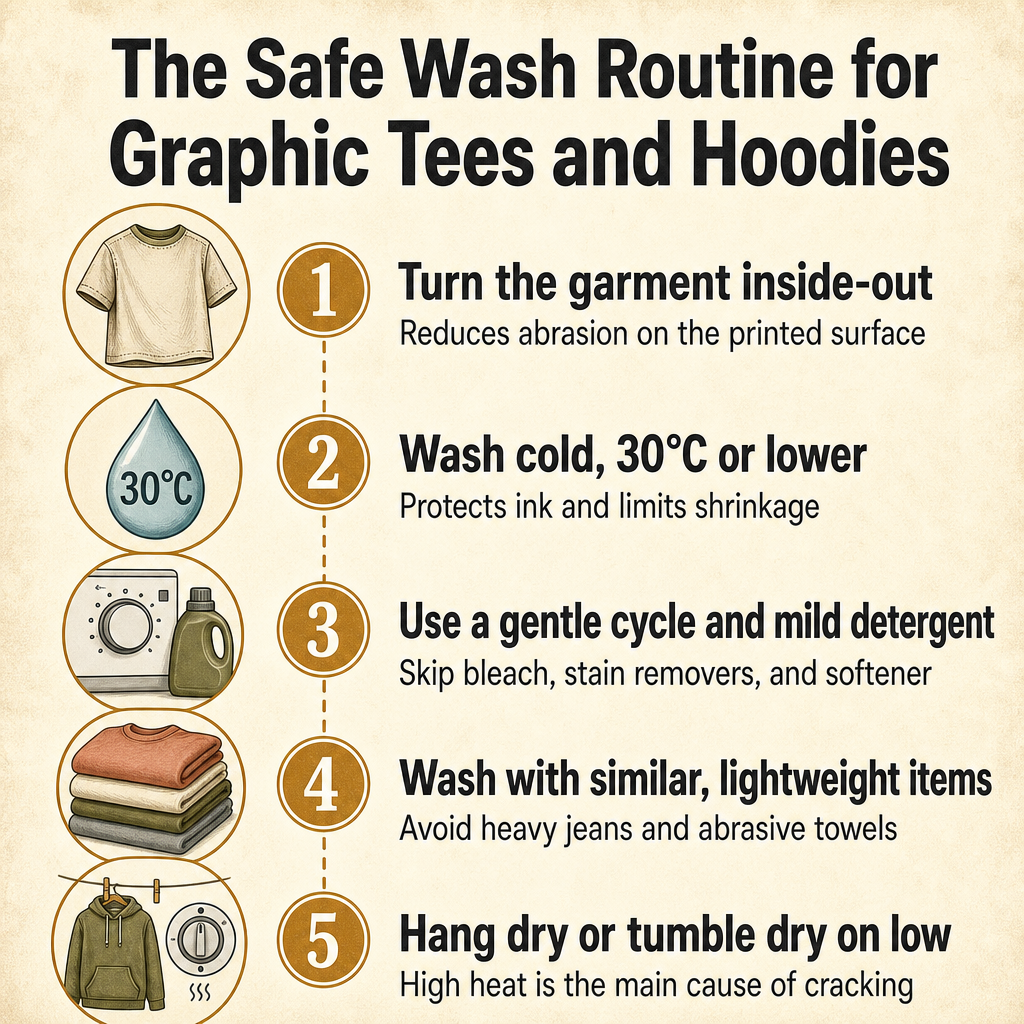
How to wash graphic shirts and printed hoodies safely: turn them inside-out, run cold water (30°C / 86°F or lower) on a gentle cycle with a mild detergent, and skip bleach and fabric softener [1] [2]. Hang-dry or tumble-dry on the lowest heat setting, and iron inside-out on low or through a cloth barrier. Most cracking, peeling, and fading comes from hot water, high dryer heat, and harsh chemicals.
What Is the Safest Water Temperature and Wash Cycle for Graphic Shirts and Hoodies?
The safest setup is cold water, a gentle cycle, and a mild detergent — that combination is the consensus across nearly every printed-apparel care guide. Printful’s direct-to-garment (DTG) care guide recommends machine-washing DTG-printed apparel inside-out, in cold water below 90°F / 30°C, on a gentle cycle, with a mild detergent and no fabric softener or bleach [1]. Monster Press and Underground Printing both extend that same rule to screen-printed tees, with washes at 30°C / 86°F or lower and a gentle cycle [2] [3]. Bolt Printing’s screen-print FAQ agrees: turn the shirt inside out, wash cold only, on a gentle or normal cycle, and skip the harsh chemicals entirely [4]. Most of the T-Shirts and printed hoodies you will find in a typical apparel shop follow these same rules T-Shirts Hoodies / Sweatshirts.
Hot water is the silent print killer. It opens up fabric fibers, softens printed ink, and sets in stains you were hoping to wash out. Cold water keeps both the fabric and the print stable. It also cuts down on shrinkage, which matters for plain cotton tees more than for polyester or tri-blends, but is a free benefit either way. If your machine has a delicates or hand wash cycle, that is usually the right pick for graphic apparel. If it does not, the standard gentle cycle is the next-best option.
Detergent choice matters too. A regular mild liquid detergent is fine. Skip anything labeled heavy duty, oxygen bleach, or with brighteners — those are designed to strip color and stains out of fabric, and they will happily strip your print at the same time. Skip fabric softener, too: it leaves a waxy coating on both fabric and printed ink that builds up over time and can lead to cracking and faded spots later on [2] [4].
- Set the water temperature to cold, ideally 30°C / 86°F or below.
- Pick a gentle or delicates cycle, not a heavy-duty or normal cycle on high agitation.
- Use a mild liquid detergent — no bleach, no oxygen brighteners, no harsh stain removers.
- Skip fabric softener entirely; it coats the print and shortens its life.
- Wash graphic tees and printed hoodies with similar, lightweight items — never with heavy jeans, towels, or anything with zippers and hooks.
Should You Wash Graphic Tees and Printed Hoodies Inside Out?
Yes — and it makes a real difference. Turning the garment inside-out before washing and drying puts the printed surface on the inside of the load, where it rubs against the soft reverse side of the fabric instead of against zippers, buttons, and other clothes. Monster Press’s printed-tee wash guide calls this out explicitly and adds that you should also keep printed tees away from heavy items like jeans and towels that physically abrade the print during the cycle [2]. Underground Printing and Bolt Printing both echo the inside-out rule for screen-printed apparel and tie it directly to preventing cracking and fading [3] [4]. PrintKK’s sublimation guide does the same for sublimation prints, where the ink has actually bonded with the polyester fibers but can still be scuffed by rough contact in the drum [9].
Inside-out washing reduces two things at once: direct abrasion on the printed surface, and direct UV exposure if you hang the garment outside to dry with the print facing the sun. The second point is easy to miss — sunlight is a major fading source for sublimation prints and a contributing factor for water-based inks, and inside-out line-drying protects the graphic without you having to think about it. It also keeps the print away from the detergent suds, which can leave a chalky film on plastisol over many washes.
If you have read any of Treehouse Lifestyle’s other apparel guides, like How Should You Choose Cannabis Apparel for Fit and Everyday Wear? on choosing cannabis apparel for fit and everyday wear, or the broader What Are the Best Cannabis Lifestyle Gifts and Accessories? on the best cannabis lifestyle gifts, the inside-out habit is the cheapest single thing you can add to whatever routine you already use. Related guides like What Bong Size Should You Get? on bong sizing cover different products but follow the same low-friction, low-damage idea: handle the thing gently and it lasts longer.
- Turn the shirt or hoodie inside-out before it goes in the machine.
- Keep printed apparel away from heavy items like jeans, towels, and hoodies with metal eyelets.
- Run the dryer cycle with the garment inside-out as well, so the print never sits against the hot drum.
- If you line-dry outside, flip the garment inside-out so the sun hits the unprinted back, not the graphic.
- Skip the iron’s face too: a print-friendly iron routine is the next section.
How Do You Dry a Graphic Tee or Printed Hoodie Without Cracking the Design?
Heat is the number-one cause of cracked graphics. Plastisol screen-print ink softens under high heat, DTG water-based ink can scorch, and even sublimation prints — where the ink has chemically bonded with polyester fibers — fade faster when repeatedly blasted with a hot dryer. Printful’s DTG guide lets you tumble-dry on low but calls hang-drying the best option [1]. Monster Press and Underground Printing both rank air-drying as the default and lowest-heat dryer setting as the backup [2] [3]. Bolt Printing’s screen-print FAQ lands in the same place: hang dry, or tumble dry on the lowest heat setting you have, and never use high heat [4]. PrintKK’s sublimation guide adds the same rule and specifically warns against leaving sublimation shirts in direct sunlight while they dry, since UV is the main fading source for that print type [9].
The other rule that helps is to remove the garment from the dryer promptly. Sitting in a hot drum for an extra twenty minutes after the cycle ends is a sneaky source of wear. Pull the shirt while it is still slightly damp, lay it flat or hang it on a hanger to finish, and you will get fewer heat-set wrinkles and a softer-feeling print. This is the same logic that guides other printed-product care, like the gentle handling covered in guides such as What Is an Ash Catcher and How Do You Choose the Right One for Your Bong? on choosing the right ash catcher: the less stress you put the material under, the longer it stays sharp.
If you have a drying rack, use it. A folding rack in a shaded corner is gentler than any dryer cycle and free to run. If you do not have space for that, lay the garment flat on a clean towel — this works especially well for heavier printed hoodies that can stretch out on a hanger while wet.
- Hang-dry or flat-dry graphic apparel whenever you have the space and time.
- If you must use a dryer, set it to the lowest heat setting — high heat is the main cause of cracking and shrinkage.
- Remove the shirt or hoodie from the dryer as soon as the cycle ends; do not let it sit in a hot drum.
- Avoid direct sunlight while drying, especially for sublimation prints that fade under UV.
- Lay heavyweight hoodies flat to dry so the wet fabric does not stretch the shoulders.
Can You Iron a Graphic Tee or Printed Hoodie Without Damaging It?
Yes, but never press the iron directly onto the print. The heat of a soleplate will melt plastisol, scorch DTG water-based ink, and even weaken sublimation dye over time. Printful’s DTG guide recommends ironing inside-out on a cool setting [1]. Monster Press’s wash guide and Underground Printing’s screen-print guide both say the same thing in different words: iron inside-out, or place a thin pressing cloth between the iron and the graphic, and use low-to-medium dry heat [2] [3]. Triple Crown’s tri-blend care section adds that low-heat ironing or steaming is the safe approach for the soft tri-blend fabric family [8].
A pillowcase works well as a pressing cloth in a pinch. Fold the shirt so the graphic is facing down against the pillowcase, and iron through the pillowcase on a low-to-medium dry setting. Steam adds moisture, which is usually fine, but if you are worried about a particular print, switch the steam off and use dry heat only. Never hold the iron in one spot for long — keep it moving, just like you would on any delicate fabric.
If you would rather skip the iron altogether, a handheld steamer held a few inches away from the print is the gentlest option. The steam relaxes the wrinkles without ever touching the graphic. For graphic hoodies that came out of the dryer a little stiff, a quick steam pass also softens the fibers back up without putting any direct heat on the print. For related care advice on softer-printed gear or accessories like Rolling Trays rolling trays and other lifestyle goods, the same idea applies: a gentle tool, kept moving, beats a hotter tool held still.
- Never press the iron directly onto the printed surface, no matter the print type.
- Iron the garment inside-out on a low-to-medium dry heat setting.
- Place a thin cloth barrier — a pillowcase or proper pressing cloth — between the iron and the graphic if you iron print-side up.
- Use a cool setting for DTG prints, which are the most heat-sensitive.
- Prefer a handheld steamer if you have one; it relaxes wrinkles without touching the print at all.
Do Tri-Blend, 100% Cotton, and Polyester Graphic Shirts Need Different Care?
The print-care rules are mostly the same — cold, gentle, inside-out, no softener — but the fabric underneath changes how much shrinkage and shape change you will see. Bolt Printing’s shrinkage reference is the cleanest summary: 100% cotton may shrink slightly even when it has been preshrunk, 50/50 cotton-polyester blends show minimal shrinkage, and polyester or performance fabrics show little to no shrinkage at all [4]. Preshrunk garments shrink less than untreated fabrics but can still shrink if exposed to heat.
Tri-blends — typically 50% polyester, 25% cotton, 25% rayon — sit in an interesting middle ground. Real Thread’s tri-blend explainer notes that tri-blends shrink much less than 100% cotton and hold their shape well through repeated washes and dries [7]. Triple Crown’s tri-blend care section adds that high heat is still the main cause of shrinkage and a shortened print life, so the same low-heat, inside-out rules apply: wash cold or warm, skip fabric softener, hang dry or tumble dry low, and iron inside-out on low [8]. PrintKK’s sublimation guide covers the polyester side of the family, where the ink bonds with the fiber so well that on 100% polyester the print can outlast the shirt itself [9].
What this means in practice: if you own mostly 100% cotton graphic tees, expect a small amount of shrinkage the first few washes and buy a touch larger if you can. If you own tri-blends or polyester-heavy performance tees, the size you buy is the size you keep, and the print tends to look newer for longer because the fabric holds its shape and the ink has more to grip. If you shop the Apparel apparel section, the care tag on each piece will tell you which family you are in — that tag is the most reliable source for any specific garment.
- 100% cotton: may shrink slightly even when preshrunk; cold water and low heat minimize further shrinkage.
- 50/50 cotton-polyester: minimal shrinkage; holds shape well and forgives small care mistakes more than 100% cotton.
- Polyester and performance fabrics: very little shrinkage; sublimation prints on 100% polyester can outlast the shirt.
- Tri-blends (polyester/cotton/rayon): shrink less than cotton, hold their shape, and need the same cold / inside-out / low-heat routine.
- Always defer to the care tag on the specific garment for fiber percentages and any special instructions.
| Fabric type | How it shrinks | Print-care notes |
|---|---|---|
| 100% cotton | May shrink slightly even when preshrunk; cold water and low heat keep it minimal | Wash cold, inside-out, no softener; consider sizing up if you machine-dry |
| 50/50 cotton-polyester | Minimal shrinkage; holds shape well and forgives small care mistakes | Same cold / inside-out / low-heat routine |
| Polyester / performance | Little to no shrinkage | Sublimation prints on 100% polyester can outlast the shirt itself |
| Tri-blend (poly/cotton/rayon) | Shrinks less than 100% cotton and holds its shape | Same cold / inside-out / low-heat routine |
Does the Print Type — Screen Print, DTG, or Sublimation — Change How You Wash It?
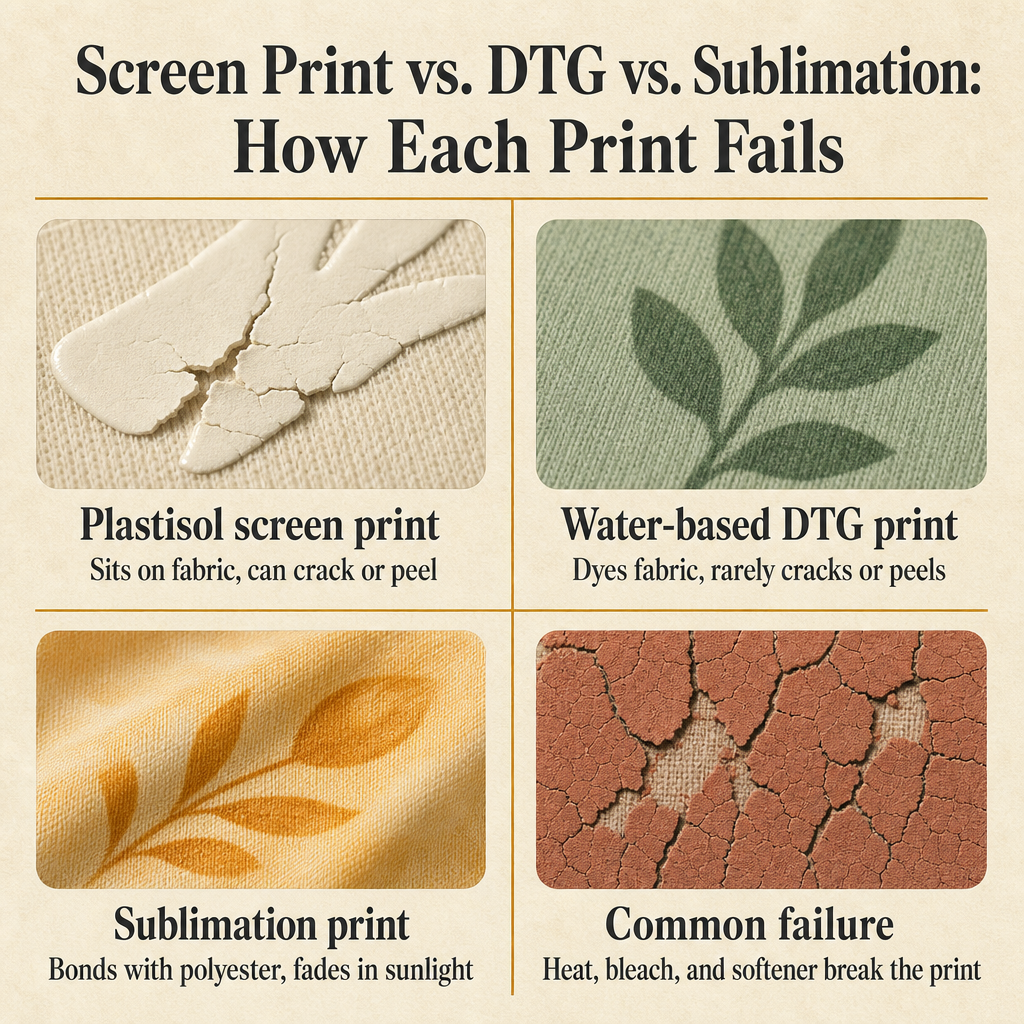
It changes how the print fails, which changes what to be careful about. The three print types you will see most often on graphic apparel are plastisol screen print, water-based DTG print, and sublimation print. Wikipedia’s plastisol article explains that plastisol is a colloidal dispersion of PVC particles in a liquid plasticizer that is cured at around 350°F / 180°C into a flexible plasticized solid that sits on top of the fabric rather than soaking into it [5]. Real Thread’s ink comparison adds that plastisol can produce a brighter print on dark fabrics, but its tradeoff is that after a handful of washes the prints can crack, peel, or flake off [6]. That is the failure mode to plan around.
Water-based DTG inks work the opposite way. Real Thread notes that water-based ink dyes the fabric and becomes part of it, so prints last as long as the garment does and rarely crack or peel [6]. Printful’s DTG guide agrees and adds that DTG is more sensitive to heat and abrasion than some other methods, so the cold, gentle, inside-out routine matters even more here [1]. The trade is that water-based prints can look slightly less vibrant on tri-blends than on 100% cotton, because the inks only dye the cotton fibers.
Sublimation is the third path. PrintKK’s sublimation guide explains that sublimation ink bonds with polyester fibers directly, so the design rarely peels or flakes off; fading happens, but it is slow and is driven by sunlight and high dryer heat rather than the ink lifting [9]. On poly-cotton blends the print may fade a little faster because the cotton fibers do not hold the dye, but the design still will not peel. So: cold, inside-out, gentle cycle, low or no heat — for all three — and pay extra attention to whichever failure mode your particular shirt has.
Putting it side by side, plastisol fails by cracking and peeling under heat, water-based DTG fails by fading and abrading under rough treatment, and sublimation fails by slow UV-driven fading. The shared enemy across the three is high heat, bleach, and fabric softener.
- Plastisol screen print: sits on top of the fabric and is the most likely to crack, peel, or flake under high heat and rough washing.
- Water-based DTG print: dyes the fabric, rarely cracks or peels, but is more sensitive to heat and abrasion than plastisol.
- Sublimation print: bonds with polyester fibers and rarely peels; fades slowly under sunlight and high dryer heat.
- Common failure driver: high heat (dryer or iron), bleach, harsh stain removers, and fabric softener.
- Shared safe routine across all three: cold water, gentle cycle, inside-out, mild detergent, no softener, low or no dryer heat.
| Print type | How it sits on the fabric | Main failure mode | Care focus |
|---|---|---|---|
| Plastisol screen print | Sits on top of the fabric | Cracks, peels, or flakes under heat and rough washing | Cold, gentle, inside-out; avoid high heat |
| Water-based DTG | Dyes into the fabric | Fades and abrades under rough treatment; more heat- and abrasion-sensitive | Cold + gentle cycle matter even more |
| Sublimation | Bonds with polyester fibers | Rarely peels; fades slowly under sunlight and high dryer heat | Cold + low/no heat; avoid direct sun while drying |
What Is Dye Migration and How Do You Stop White Ink From Turning Pink?
Dye migration is what happens when dye from the garment fabric bleeds into the printed ink and discolors it — most often, white screen-printed ink turning pink, peach, or off-color on a polyester or dark-dyed hoodie. Bolt Printing’s screen-print FAQ explains that this discoloration is dye migration, which is most likely on 100% polyester garments and on dark or heavily-dyed fabrics like red, charcoal, and purple [4]. The dye from the fabric slowly works its way into the white ink, especially under heat.
The honest version is that dye migration is mostly a production and fabric issue, not a wash-care issue. If the shirt was printed with the wrong ink or cured at the wrong temperature at the factory, no home routine will fully reverse it. What a careful wash routine can do is limit further dye movement once the shirt is in your hands. Cold water matters: it keeps the fabric fibers tight and slow to release dye. Low dryer heat matters: it reduces the activation energy that drives dye into the printed ink. Skip the iron altogether on affected areas, since direct heat is the worst offender.
If you are shopping for a new printed hoodie and dye migration is a concern, look at the fabric content and the print type up front. White ink on a 100% polyester hoodie is the highest-risk combination. White ink on a 100% cotton or cotton-rich tri-blend hoodie is much lower risk. Sublimation prints on polyester do not have the same dye-migration problem in the white-ink sense, because there is no surface white ink — the color is the fiber.
- Dye migration discolors white screen-printed ink when fabric dye transfers into it, usually turning the white pink, peach, or off-color.
- It is most common on 100% polyester and on dark or heavily-dyed fabrics like red, charcoal, and purple.
- Heat accelerates dye migration, so washing in cold water and avoiding high dryer heat slows further dye movement.
- Skip the iron on affected prints — direct heat is the worst offender for activating dye transfer.
- If you are buying new, white ink on cotton-rich fabric is much lower risk than white ink on 100% polyester.
Frequently Asked Questions
How often should you actually wash a graphic t-shirt or printed hoodie?
Wash only when it really needs it. Spot-clean small marks, air the garment out between wears, and save full washes for actual odor or visible soil. Every wash slowly stresses the print, so fewer washes means a longer-lasting graphic.
Is it ever safe to use stain remover on a graphic tee?
Handle stain removers like bleach — most are too aggressive for printed ink. Spot-test inside-out on a hidden seam first, or try a mild detergent and a soft brush on the spot before reaching for a stronger product.
Can you dry-clean a graphic hoodie?
Skip it. The solvents and heat used in dry-cleaning can soften plastisol ink, fade water-based and sublimation prints, and cause the graphic to lift or smear. Stick to gentle machine washing or hand washing.
Why does the print on my favorite hoodie feel stiff or sticky after washing?
That usually means fabric softener or a heavy detergent has left a coating on the print. Wash the garment again inside-out in plain cold water with a mild detergent and no softener, and the print should soften back up as the residue clears.
How long should a screen-printed graphic actually last?
With proper care — cold washes, inside-out, no softener, low or no heat in the dryer — a screen-printed graphic should look clean for years. Cracking and peeling after only a handful of washes almost always points back to hot water, high dryer heat, or harsh chemicals.
So What Is the Simplest Routine That Keeps a Graphic Tee or Hoodie Looking New?
The whole routine reduces to one rule: be gentle with heat and gentle with chemicals. Wash cold (30°C / 86°F or lower), inside-out, on a gentle cycle, with a mild detergent and no fabric softener or bleach. Skip the iron on the print side, and either air-dry or tumble dry on the lowest heat setting. That single routine covers screen-printed tees, water-based DTG prints, and sublimation prints, and it covers the three main fabric families — 100% cotton, tri-blend, and polyester — without any special steps. The only time you need to add anything is when a specific print or fabric has a known weak point, like avoiding white-on-polyester if dye migration is a concern.
If you are shopping for new graphic apparel, the same principles help you pick better pieces in the first place. Look at the fabric content to predict shrinkage and print behavior. Look at the print type to know what failure mode to plan around. Read the care tag, follow the inside-out habit from day one, and store your favorite pieces somewhere they will not get pulled, stretched, or sun-bleached between wears. Stack enough small good habits and the graphic will outlast the trend that made you buy it. Treehouse Lifestyle ships graphic tees and printed hoodies with free shipping on orders $150+, so it is easy to stock up on a few favorites and rotate them so each one gets a break between washes.
Start with the lowest-effort change — turning your printed apparel inside-out before it goes in the wash — and build from there. Within a few weeks the habit is automatic, your dryer runs cooler, your detergent is milder, and your favorite graphic tees still look the way they did the day they arrived.
Sources
- Printful: How to Take Care of DTG Products?
- Monster Press: Wash Guide For Screen Printed and DTG Printed T-Shirts
- Underground Printing: How to Wash and Care for Screen Printed Shirts to Prevent Cracking and Fading
- Bolt Printing: How to Wash Screen Printed Shirts (Without Ruining the Print)
- Wikipedia: Plastisol
- Real Thread: Water-Based Ink vs. Plastisol: What’s the Difference?
- Real Thread: What Exactly is a Tri-Blend?
- Triple Crown Products: What Is a Tri-blend T-shirt?
- PrintKK: How to Wash Sublimation Shirts: The Complete Care Guide