

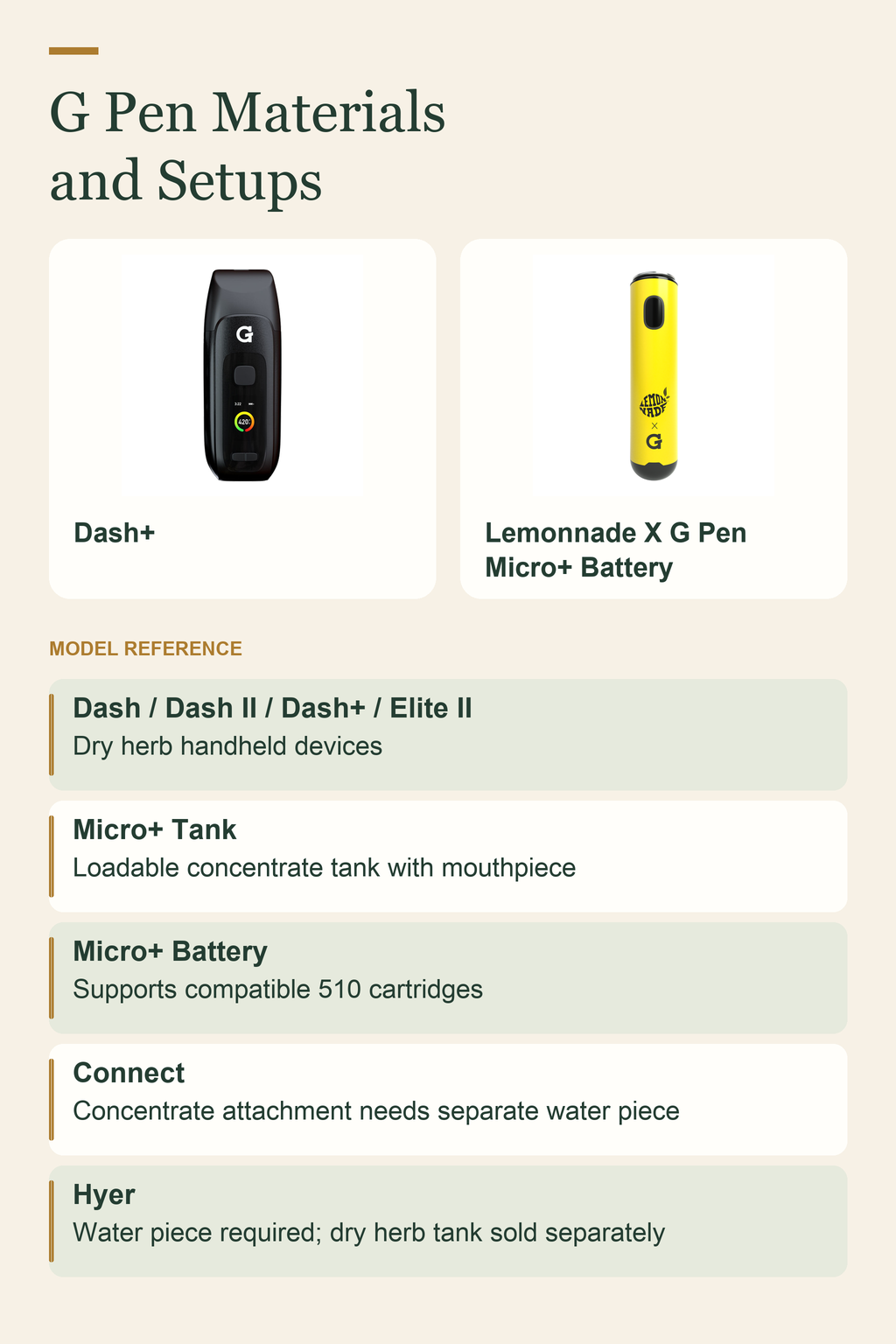
Choose a G Pen by material and setup. Dash models and Elite II are dry herb handhelds. Micro+ uses a concentrate tank or compatible 510 cartridge. Connect needs a separate water piece for concentrates. Hyer also needs a water piece; its dry herb tank is sold separately. Check the exact generation and box contents before buying. [1] [4] [5]
G Pen is a Grenco Science brand, but its devices do not all work with the same materials. This guide compares model features, included parts, and setup needs. Manufacturer documentation explains each model; it does not prove that Treehouse Lifestyle currently stocks it.
Which G Pen models work with dry herb, concentrates, or cartridges?
Start with what you intend to load. Ground dry material goes into a dry herb chamber. A loadable concentrate tank is a different part. A cartridge is a separate unit that connects to a compatible battery. A shared brand name does not make these setups interchangeable.
The dry herb group includes the original Dash, Dash II, Dash+, and Elite II. Dash II explicitly excludes concentrates, oils, and 510 cartridges. Dash+ is designed only for ground dry materials. Do not add wax to either chamber or assume a cartridge will connect because another G Pen model accepts one. [1] [2] [3]
Micro+ gives buyers two documented configurations: its supplied concentrate tank and a compatible 510 cartridge attached to its battery. That extra option does not make Micro+ a dry herb device. Connect and Hyer differ again because they pair with separate glass-on-glass water pieces. [4] [5]
Use the checklist below to match material and format before comparing screens, colors, or accessories. A handheld and a glass attachment require different shopping lists.
Browse Treehouse Lifestyle’s Vaporizers to check exact listings, rather than assuming every model discussed here is available. If you are comparing brands as well as formats, the guide Which Yocan vaporizer is right for your budget and setup? gives you another shopping framework. Compare the listed material and required setup for each individual device, not just its brand.
- Dry herb handhelds: original Dash, Dash II, Dash+, and Elite II have chambers intended for ground dry material.
- Micro+ with its supplied tank: a concentrate pen with its own mouthpiece and a loadable tank.
- Micro+ with a cartridge: its battery supports compatible 510 cartridges in a separate configuration from the supplied tank.
- Connect: a concentrate attachment for a separate glass-on-glass water piece, not a handheld with its own mouthpiece.
- Hyer: a water-piece system with material-specific tanks; the standard kit includes the concentrate tank, while the dry herb tank is sold separately.
| G Pen model | Material | Setup needed |
|---|---|---|
| Original Dash, Dash II, Dash+, Elite II | Ground dry herb | Handheld device |
| Micro+ | Concentrates or compatible 510 cartridges | Supplied tank or separate compatible cartridge |
| Connect | Concentrates | Separate water piece and matching adapter |
| Hyer | Concentrates; dry herb with optional tank | Separate water piece; dry herb tank sold separately |
What is the difference between the G Pen Dash, Dash II, Dash+, and Elite II?
These four models belong in the dry herb comparison, but their names do not tell the whole story. The original Dash uses three preset temperatures and a glass-glazed stainless steel chamber. Dash II uses conduction heating, a ceramic chamber, precise adjustable temperature control, and an OLED display. Those are different specifications, not alternate descriptions of one device. [1] [2]
The original Dash’s listed presets are 375°F/190°C, 401°F/205°C, and 428°F/220°C. These are that model’s control settings, not specifications for later Dash generations. Its Micro-USB connector also differs from the USB-C charging listed for Dash II. [1] [2]
Dash II’s manufacturer lists an approximately 30-second heat-up, a 0.4g chamber, and a 1,100mAh battery. Dash+ has a titanium chamber with hybrid conduction and convection heating, a full-color display, three-button controls, and a 1,800mAh battery. Dash+’s approximately 0.3g chamber capacity depends on grind density and fineness, so avoid reading those chamber figures as exact amounts for every load. [2] [3]
Elite II offers a full ceramic chamber with conduction and convection dual heating. The manufacturer landing page lists individual temperature control from 200°F to 430°F, a full-color TFT display, a zirconia magnetic mouthpiece with a spiral air path, and a 2,100mAh battery. These are Elite II details; do not transfer them to an original Elite listing. [1]
Battery capacity is a specification, not a session count. A larger number does not establish how many hours a device will run at your chosen settings. Compare the documented controls and included items without guessing runtime.
During research, the original Dash product URL redirected to Dash II. That makes the full generation name especially important when reading an older listing. Ask whether the item is the original Dash, Dash II, or Dash+, and check that its photos and specifications agree. [2]
For the material distinction behind this comparison, read How Do Dry Herb Vaporizers Differ from Concentrate Vaporizers?. For a broader explanation of device types and basic operation, read What Is a Vaporizer and How Does It Work?. You can also examine the Arizer Go SRT Vaporizer listing as a separate product comparison; it is not a G Pen model, and its specifications should be checked on its own page.
- Original Dash: dry herb chamber made from glass-glazed stainless steel, three preset temperatures, magnetic mouthpiece, haptic feedback, and Micro-USB pass-through charging. Check the exact listing for box contents. [1]
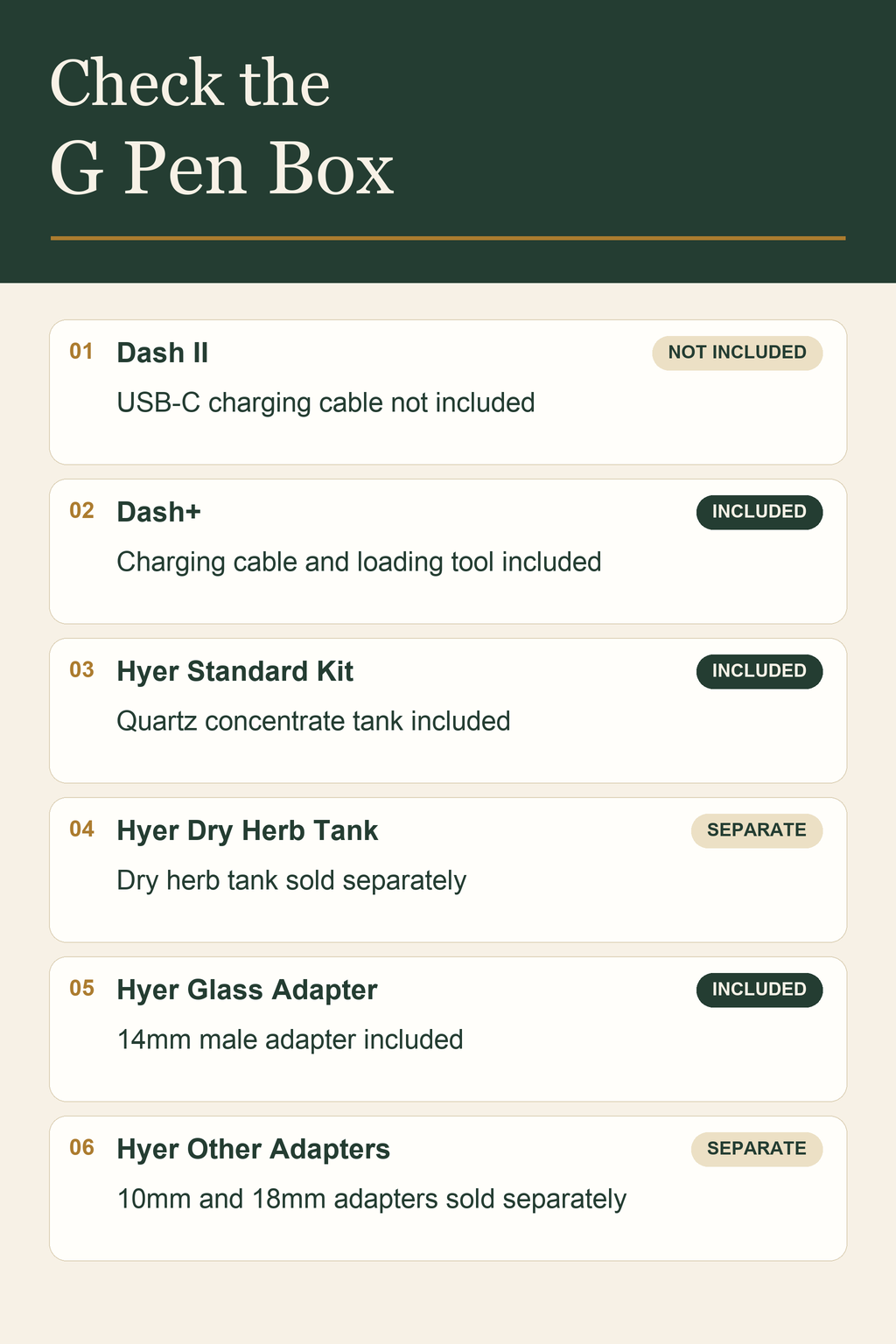
- Dash II: dry-herb-only conduction device with a ceramic chamber, OLED display, adjustable temperature, USB-C pass-through charging, and a built-in loading tool. Its box list says the USB-C charging cable is not included. [2]
- Dash+: ground-dry-material device with a titanium hybrid-heating chamber, full-color display, three-button controls, haptic feedback, and USB-C charging. Its listed accessories include a charging cable, mouthpiece silicone sleeve, and loading tool. [3]
- Elite II: dry herb model with a ceramic dual-heating chamber, TFT display, zirconia magnetic mouthpiece, and USB-C charging. The manufacturer lists a built-in pick tool, protective silicone sleeve, and hemp travel case. [1]
How do the G Pen Micro+, Connect, and Hyer compare for concentrates?
The main difference is how much of the setup each device supplies. Micro+ includes its own mouthpiece and loadable concentrate tank. Connect and Hyer pair with a separate water piece, so the device box alone is not the whole setup. Decide whether you want a self-contained pen or an attachment before comparing smaller hardware details. [1] [4] [5]
Micro+’s supplied tank has a ceramic heating plate and quartz liner. Its 850mAh battery uses USB-C charging and supports compatible 510 cartridges through Cartridge Recognition Technology. Loading the supplied tank and attaching a cartridge are separate configurations. [4] [6]
The Micro+ FAQ describes blue for low heat, green for medium, and red for high. It also lists a 10-second session heat mode and USB-C pass-through charging. Keep those color labels as given. They do not provide a basis for inventing a matching temperature in degrees. [4]
Connect uses a ceramic heating element, reverse airflow, three heat settings, an 850mAh magnetic battery connection, and a spring-loaded carb release. Those features describe the attachment’s hardware. They do not make it a dry herb handheld or establish that it will fit any glass piece without checking the adapter. [1] [6]
Hyer is a portable electronic nail with a battery that connects to the tank housing through a magnetic power cable. The standard kit includes a quartz concentrate tank, and the manufacturer lists a 6,000mAh battery with USB-C pass-through charging. Dry herb use requires the separately sold dry herb tank; it is not a second use for the included concentrate tank. [5]
Micro+ and Connect share a listed battery capacity, but that does not prove equal runtime. Their formats and required parts differ. For a broader look at pen formats, read What Is a Pen Vaporizer and How Do You Choose the Right One?. Use each model’s own instructions to confirm material compatibility.
- Choose Micro+ for a self-contained concentrate pen format with its own mouthpiece and supplied loadable tank; check cartridge compatibility separately if you plan to use that configuration.
- Choose Connect when your intended setup includes a separate compatible water piece and a concentrate attachment with the correct glass adapter.
- Consider Hyer when you want a water-piece system with material-specific tanks, while budgeting for a dry herb tank or alternate adapter if your setup needs one.
What glass adapters and extra parts do G Pen Connect and Hyer need?
Check the glass connection before ordering either attachment. A joint’s size and connection type are separate details. Knowing only that you own a water pipe does not establish a fit, and a product photo cannot replace the joint specification.
For Connect, the manufacturer lists 10mm, 14mm, and 18mm glass-on-glass attachments for female-jointed water pieces. That describes available attachment options, not a promise that every kit contains all three. Read the precise kit’s included-parts list and check the device-specific adapter you intend to use. [1]
Hyer’s standard kit includes a 14mm male glass adapter. Its 10mm and 18mm adapters are sold separately. The same kit includes a quartz concentrate tank, while the dry herb tank is another separate purchase. These Hyer details should not be copied onto a Connect shopping list. [5]
Follow the checks below in order, so you identify the connection before choosing extra parts. If the joint description is unclear, read What Bong Adapter Do I Actually Need? for background and then confirm the exact device adapter with the listing or seller.
Do not assume Connect and Hyer adapters or tanks interchange because both devices use glass-on-glass setups. Match replacement parts by their full device name and part description. If a listing leaves out the adapter size or tank type, resolve that missing detail before placing the order rather than adding an adapter by guesswork.
- Identify your water piece’s joint size and connection type from its specifications. Record both details instead of relying on appearance.
- Check the adapter documented for the exact Connect or Hyer kit. Match the device-specific part to your glass connection.
- Read the box list to see which adapter and tank are included. Separate those items from accessories merely shown nearby on the product page.
- Add only the separately sold parts your setup needs, such as a Hyer dry herb tank or a documented alternate Hyer adapter. Confirm the final parts list before ordering.
What should you check before buying a G Pen vaporizer?
Make a short shopping note with three headings: material, device, and extra parts. Put your intended material at the top, then list only devices documented for that use. This keeps an appealing screen or finish from pulling you toward the wrong chamber or format.
Next, decide whether a separate water piece belongs in your setup. A handheld dry herb device and a glass attachment solve different setup needs. If you are reviewing a piece such as SILICONE BEAKER BONG WITH REMOVABLE GLASS BOWL, use its actual joint specification before assuming it accepts Connect or Hyer. A removable bowl alone does not establish device compatibility.
Check charging by exact model. The original Dash uses Micro-USB, while Dash II, Dash+, Elite II, Micro+, and Hyer have documented USB-C charging. Dash II’s box list excludes its USB-C cable, while Dash+ lists a charging cable. Connector type and included cable are two separate purchase checks. [1] [2] [3] [4] [5]
Include required extras when you compare the listed purchase price, but do not rely on an old price quoted in a guide. Check the current listing for the device and each needed tank, adapter, cable, or replacement part. A manufacturer’s lineup page is not a stock report for a retailer.
Stick to specifications you can confirm. Do not compare guessed charging speeds, session counts, or warranty terms. If two listings describe the same generation differently, ask the seller to confirm the details before buying.
- Choose the material first: dry herb, a loadable concentrate tank, or a compatible cartridge configuration.
- Choose the format next: a handheld with its own mouthpiece or an attachment that requires a separate water piece.
- Confirm the full model generation. Distinguish original Dash, Dash II, and Dash+, as well as Elite II from original Elite.
- Compare documented controls and the charging connector. Decide whether presets or an adjustable display match your preferred way of operating the device.
- Inspect the box list for the cable, loading tool, tank, case, and adapter you expect. Do not count an optional accessory as included.
- Check model-specific replacement parts and warranty terms, then retain the listing details and purchase receipt for later reference.
How do you clean the G Pen Dash+ and find the right replacement parts?
Use the instructions for the model you own, not a general method for everything carrying the G Pen name. Dash+’s manufacturer FAQ provides a specific process involving an alcohol-moistened cotton swab and drying before reinsertion. That process should not be assumed to apply to Micro+, Connect, Hyer, or another Dash generation. [3]
The Dash+ FAQ permits separate soaking for the specified screen filter and ceramic spiral air-path components. It does not turn the whole electronic device into a soakable part. Identify those removable components in the manufacturer’s instructions before working on them, and keep the device itself out of a soaking container. [3]
The ordered steps below summarize the documented Dash+ care sequence. Consult the full instructions for how each part comes out and goes back in. If you cannot identify a component, pause and confirm its name rather than pulling on an unfamiliar assembly.
When shopping for a replacement, match the model, generation, and part name. G Pen lists separate mouthpieces, screens, tanks, batteries, and adapters for different devices. A part described as a G Pen tank is not enough information to establish a match. [6]
Keep the original part description or order details with your device paperwork. Use them to identify a replacement when similar names appear. For other G Pen models, follow their own cleaning directions rather than borrowing the Dash+ process.
- Switch the Dash+ off and let it cool before starting the manufacturer’s cleaning process.
- Prepare a cotton swab moistened with isopropyl alcohol, then squeeze out excess liquid as directed in the Dash+ FAQ.
- Clean only the specified parts by their documented method. Reserve separate soaking for the identified screen filter and ceramic spiral air-path components, not the whole electronic device.
- Let cleaned components air dry before reinserting them. Follow the model’s instructions when putting the assembly back together. [3]
What warranty applies to the exact G Pen model you buy?
There is no single warranty duration you can apply to every G Pen model. The general warranty page places Connect in a one-year limited program. It lists original Dash, Micro+, Hyer, Dash+, and Elite II in a two-year program. Those model names matter; the page’s Dash wording should not be stretched to include every later Dash generation. [7]
Dash II’s product page gives different terms: six months, extended to one year with registration. Dash+’s product FAQ also mentions a registration extension. Check that model’s current wording and conditions rather than inventing an extension duration or assuming all registration programs are alike. [2] [3]
The general policy requires proof of purchase and excludes consumable mouthpieces, tanks and coils, normal battery degradation, water damage, and other listed damage. A limited warranty is not a promise that every part will be replaced. Read the exclusions alongside the duration before treating coverage as part of the buying decision. [7]
Save the receipt, full model name, and relevant warranty wording with your order information. If a retailer and manufacturer use different generation names or terms, ask which coverage applies before ordering. Keep any registration confirmation with those records.
- Confirm the exact generation, especially when a listing uses Dash without II or +.
- Read the applicable model’s product-page terms as well as the general warranty policy.
- Check registration requirements and any stated extension conditions without assuming a brand-wide rule.
- Keep proof of purchase and device identification with your order records.
- Review excluded consumable parts, normal battery degradation, water damage, and other listed damage before expecting coverage.
Frequently Asked Questions
Can you use wax or oil cartridges in a G Pen Dash+?
No. Dash+ is designed only for ground dry materials. Dash II also explicitly excludes concentrates, oils, and 510 cartridges. Micro+ has a separate cartridge-compatible battery configuration, but that does not establish compatibility for Dash models. Choose by the exact device’s stated material, not by the shared G Pen name. [2] [3] [4]
Is the G Pen Micro+ only a cartridge battery?
No. Micro+ includes a loadable concentrate tank and its own mouthpiece. Its battery also supports compatible 510 cartridges through Cartridge Recognition Technology. Using that battery with a cartridge is a separate configuration from loading the supplied tank. Neither option establishes dry herb compatibility. Check the intended configuration before buying accessories. [4]
Can you use the G Pen Connect without a water pipe?
Connect is designed as a concentrate attachment for a separate glass-on-glass water piece. It is not a self-contained dry herb pen with its own mouthpiece. Check the water piece’s joint and the exact kit’s adapter before ordering; the availability of several adapter sizes does not mean every kit includes them all. [1] [6]
Does the G Pen Hyer include its dry herb tank?
The standard Hyer kit includes a quartz concentrate tank. Its dry herb tank is sold separately. The standard kit also includes a 14mm male glass adapter, while 10mm and 18mm adapters are sold separately. Plan the complete setup from the box list rather than assuming every supported option comes with the device. [5]
Does the G Pen Dash II come with a charging cable?
Its manufacturer box list says the USB-C charging cable is not included. Dash+ lists a charging cable, so similarly named models do not necessarily have the same box contents. Check both the charging connector and the included accessories on the exact listing, especially when comparing original Dash, Dash II, and Dash+. [2] [3]
How do you narrow down the right G Pen for your setup?
Choose the material first, the format second, and the exact kit third. For dry herb, compare the documented Dash generations and Elite II. For a self-contained concentrate pen, examine Micro+ and distinguish its tank from its cartridge-compatible battery configuration. For a separate water-piece setup, check Connect or Hyer and the required adapter. Hyer’s dry herb option needs its separately sold tank. [1] [4] [5]
Then compare the details that affect ownership: controls, charging connector, box contents, replacement parts, and exact-generation warranty terms. Keep current listing information separate from older manufacturer descriptions. There is no need to rank unlike setups as if they all do the same job; the useful choice is the one whose documented material, format, and included parts match the setup you intend to buy.
Sources
- G Pen / Grenco Science: Landing Page — G Pen Vaporizer Lineup
- G Pen / Grenco Science: G Pen Dash II Vaporizer
- G Pen / Grenco Science: G Pen Dash+ Vaporizer
- G Pen / Grenco Science: G Pen Micro+ Vaporizer
- G Pen / Grenco Science: G Pen Hyer Vaporizer
- G Pen / Grenco Science: Buy Vape Pen Accessories – Chargers, Cases, Supplies | G Pen
- G Pen / Grenco Science: G Pen Warranty | Grenco Science