

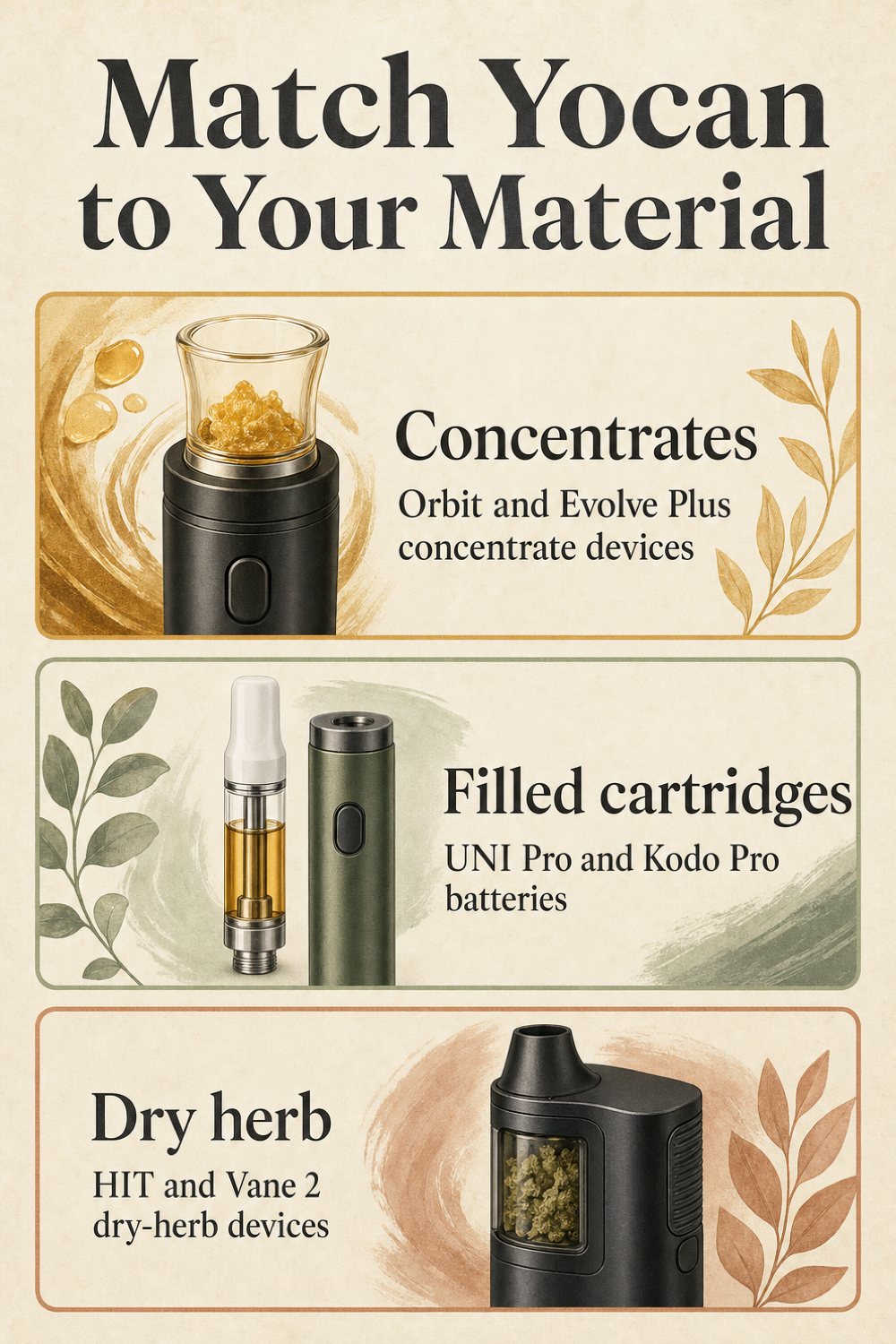
Choose a Yocan vaporizer by what you plan to load: concentrates, a filled 510 cartridge, or dry herb. The original Orbit and Evolve Plus are concentrate devices. UNI Pro and Kodo Pro power cartridges, while HIT and Vane 2 have dry-herb chambers. Compare the exact version, controls, replacement parts, and warranty before deciding which fits your budget. [1] [2] [4] [7]
A lower price is only useful if the device fits your material and includes the parts you need. Check what comes in the box, which controls you will use, and what you may need to replace.
This is a feature-based buying guide, not a Treehouse hands-on Yocan review. It draws on product specifications, warranty terms, and one reviewer’s upkeep observations. Those sources do not prove years of service. Use the comparisons to build a shortlist, then check the current listing before buying.
Which Yocan devices work with concentrates, cartridges, or dry herb?
Start with the material, not the device shape. A slim pen, small box, and pocket-size chamber may appear in the same shopping results yet do different jobs. Check what each model accepts before comparing its price or display.
A concentrate pen gives you a place to load your own concentrate. A cartridge battery provides power to a compatible filled cartridge. A dry-herb model has a chamber for loose dry herb. Yocan’s Orbit, UNI Pro, and Vane 2 pages show these separate designs clearly. [1] [2] [4]
This distinction matters when you compare prices. A cartridge battery and a complete chamber device are not like-for-like purchases. Check what comes in the box and what you must supply separately before deciding that one listing is a better deal.
If you have not settled on a device type, browse Vaporizers with your intended material in mind. Use the category to narrow the search, then read each model’s description rather than assuming every result handles the same material.
Before shopping, note your intended material, whether you already own a cartridge, and which parts you need included. Use that note to rule out the wrong device type. A display or large battery number does not fix a material mismatch.
- Concentrates: compare the original Orbit and Evolve Plus as load-your-own concentrate devices. Their heating assemblies and upkeep needs differ. [1] [7]
- Filled cartridges: compare UNI Pro and Kodo Pro as 510 cartridge batteries. Check the cartridge connection and fit before buying. [2] [3]
- Dry herb: compare HIT and Vane 2 as chamber-based models. Do not mistake their chambers for cartridge holders or concentrate cups. [4] [6]
| Material | Yocan models to compare | Purchase check |
|---|---|---|
| Concentrates | Original Orbit; Evolve Plus | Cup or coil design and matching replacement parts |
| Filled 510 cartridges | UNI Pro; Kodo Pro | Cartridge dimensions, connection, and required adapter |
| Dry herb | HIT; Vane 2 | Exact-generation chamber, controls, and mouthpiece details |
How does the Yocan Orbit compare with the Evolve Plus?
The original Yocan Orbit uses a coil-less quartz cup and two quartz balls. Yocan describes a top airflow system that turns the balls to spread heat. That is the manufacturer’s explanation of the design, not an independently measured result or a promise about every use. [1]
Evolve Plus takes a different approach. Yocan describes a built-in storage jar, and its separate replacement-coil page lists ceramic donut and quartz dual coils for Evolve Plus. Those named parts do not establish compatibility with Orbit or other similarly named pens. [7] [10]
For the original Orbit, Yocan lists a 1700mAh battery, USB-C charging, and three voltage presets: 3.4V, 3.7V, and 4.0V. Its dimensions are listed as 131 by 22mm, and the stated charging time is 2.5 hours. These figures describe the original model; they are not a fixed session count or specifications for every later version. [1]
The quartz balls add a practical ownership question: are you willing to clean and keep track of small pieces? Vape Guy reports that the balls become sticky with residue. This is the reviewer’s maintenance observation, not Treehouse testing, and it is worth weighing alongside the cup design. [8]
Orbit’s three presets are voltage settings, not exact chamber temperatures. If your main goal is precise temperature adjustment, do not read a voltage label as a temperature display. Vape Guy also identifies the original Orbit’s lack of precise temperature control. [1] [8]
If you are still comparing device types, use our guide, How Do You Choose the Right Portable Vaporizer?, before narrowing the choice to two concentrate pens. For the pen format itself, What Is a Pen Vaporizer and How Do You Choose the Right One? gives you another way to organize the purchase. Neither guide replaces the exact model’s parts list or manual.
Choose by the parts you want to maintain, not a claim that one design must last longer. Consider Orbit’s cup and small balls alongside the named Evolve Plus coils. Check the current bundle and replacement listings before deciding which setup suits you.
- Heating assembly: original Orbit has a coil-less quartz cup and two quartz balls; Evolve Plus has separately listed ceramic donut and quartz dual replacement coils. [1] [10]
- Storage: Yocan describes a built-in concentrate storage jar on Evolve Plus. Check the exact listing for the version you are buying. [7]
- Controls and charging: the original Orbit has three voltage presets and USB-C charging, with a manufacturer-listed 2.5-hour charge time. [1]
- Parts to track: weigh Orbit’s small quartz balls against the specific replacement coils listed for Evolve Plus. Do not order by brand name alone. [8] [10]
Should you choose the Yocan UNI Pro or Kodo Pro for a cartridge?
UNI Pro and Kodo Pro belong on a cartridge-battery shortlist. Neither supplies the original Orbit’s load-your-own quartz cup or a dry-herb chamber. The useful comparison is cartridge fit and control layout, not which one has the better oven. [2] [3]
UNI Pro uses a magnetic cartridge adapter and adjustable width and height. Yocan’s page lists a 7–14mm adjustable width dial, a 650mAh battery, an OLED display, and voltage adjustment from 2.0V to 4.2V in 0.1V steps. Check actual cartridge dimensions rather than taking universal-fit wording as a guarantee. [2]
Kodo Pro is described as a compact 510 battery. Its manufacturer page lists an OLED display, puff counter, timer, 10-second preheat, and adjustment from 1.8V to 4.2V in 0.1V steps. Decide whether those controls answer a real need for you; a longer feature list alone does not settle the purchase. [3]
The UNI Pro page mixes generation and construction details, including references to UNI Pro 2.0 and different materials. Do not apply one material description or charging port to every version. For the linked Yocan UNI Pro 2.0 Battery Mod | 650mAh listing, confirm its own specifications and included adapter rather than borrowing details from another UNI Pro page.
Check fit before convenience features. A display and wide voltage range will not help if your cartridge does not fit. Battery capacity also does not tell you exactly how many sessions you will get.
- Check your cartridge first. Confirm the 510 connection and record its dimensions, then compare them with the exact device listing and any stated fit limits.
- Verify the connection hardware. For UNI Pro, check the required magnetic adapter and whether the listing includes it. Do not assume a bundle contains every part you need. [2]
- Identify the generation. Match the full product name, model version, and charging information across the listing, packaging, and manual before you buy.
- Compare controls last. Weigh UNI Pro’s adjustable cartridge enclosure against Kodo Pro’s compact format and display features, then review the current price and seller terms. [2] [3]
What should you compare on the Yocan HIT and Vane 2 for dry herb?
HIT and Vane 2 are dry-herb choices, so focus on their chamber, controls, and parts. A comparison with a cartridge battery will not tell you much about their day-to-day setup. Keep the model names precise: Vane 2 specifications should not be assigned to the original Vane. [4] [6]
Yocan lists Vane 2 with a ceramic heating chamber, color LCD, magnetic mouthpiece connection, 1200mAh battery, and USB-C charging. The manufacturer also gives an adjustable range of 200–480°F and automatic shutdown after 30 minutes. Those are device specifications, not a suggested session length or a temperature recommendation. [4]
The Yocan Vaporizer retail website lists HIT with a ceramic chamber, OLED display, vibration notices, an integrated stir tool, three- and five-minute modes, a 1400mAh battery, and USB-C charging. These are retailer-reported details. Check them against the specific version offered by the seller before choosing a product. [5]
There is also a source conflict worth knowing. Yocan’s HIT page uses conduction wording, while the retailer uses convection. The supplied sources do not settle that difference, so this guide does not pick a heating label or build a recommendation around it. [5] [6]
Compare how you would use the display, handle the mouthpiece, and find model-specific care directions. Our guide, How Do You Clean and Maintain a Vaporizer So It Lasts?, can help you plan upkeep questions, but use the device manual for actual cleaning instructions. Do not transfer a method from another chamber or mouthpiece just because both devices carry the Yocan name.
The listed 1400mAh and 1200mAh capacities are not a controlled runtime comparison. They do not prove which model lasts longer between charges. Focus on the features you will use and the parts included with the exact version.
- Chamber: Vane 2’s manufacturer and HIT’s retailer describe ceramic chambers. Confirm the intended dry-herb use on the exact product listing. [4] [5]
- Display and notices: compare Vane 2’s color LCD with HIT’s retailer-listed OLED and vibration notifications. Think about which information you want to read or receive. [4] [5]
- Mouthpiece and tools: Vane 2 lists a magnetic mouthpiece connection, while HIT’s retailer lists an integrated stir tool. Check how those parts are documented and replaced. [4] [5]
- Timing and charging: distinguish HIT’s listed three- and five-minute modes from Vane 2’s listed 30-minute shutdown. Verify charging details for your version. [4] [5]
Do Yocan voltage settings give you exact temperature control?
No: a voltage setting is not a promised chamber temperature. The original Orbit lists three voltage presets, and UNI Pro and Kodo Pro list adjustable voltage ranges. Vane 2, by contrast, lists an adjustable temperature range in degrees. Read the units before deciding what kind of control a device offers. [1] [2] [3] [4]
Do not turn volts into a temperature chart for these models. The supplied research does not provide a measured conversion, and a voltage number should not be used to promise a specific result. A smaller adjustment step is still a voltage step, not proof of exact chamber-temperature control.
For the original Orbit, Yocan specifies three clicks to change voltage and two clicks to start or stop its 10-second preheat. Use the manual supplied with your device rather than copying that sequence to another pen or generation. A similar-looking button does not establish identical controls. [1]
Our guide, What Temperature Should You Set a Vaporizer To?, is useful background when comparing temperature-based controls. Keep the distinction clear when reading it: Orbit’s voltage presets are not a substitute for a model-specific temperature specification.
Before first use, find the model’s control instructions. Check what the screen or indicator reports, how adjustments work, and what preheat does. If the listing and manual disagree, ask the seller to confirm the version instead of guessing.
- Identify the model and generation. Match the device name on its packaging to the manual you are reading.
- Find the control instructions. Use the supplied button sequence and adjustment directions, not a generic Yocan tutorial.
- Check the units. A value marked V describes voltage; a listed value in °F or °C describes a temperature setting. Do not substitute one for the other.
- Read the preheat description separately. Confirm its start, stop, and timing instructions rather than assuming it changes the adjustable setting.
What upkeep and replacement parts should you budget for with Yocan?
Budget value includes the parts you may need after the first purchase. Before comparing two checkout totals, find out what each device contains, what is removable, and which replacements are listed for that exact model. A low starting price tells you little about a missing adapter or a replacement part you have not priced.
Orbit’s quartz balls are a useful example. Vape Guy reports sticky residue on the balls and the extra small-part upkeep they require. That observation does not set a cleaning schedule, but it gives you a clear question to ask yourself: do you want another pair of small pieces to clean and keep track of? [8]
For Evolve Plus, the supplied accessory source names ceramic donut and quartz dual replacement coils. It does not give a universal coil lifespan or establish that these parts fit other Yocan devices. Read the replacement listing’s compatibility details before adding anything to your cart. [10]
Cartridge buyers should check the UNI Pro magnetic adapter and fit requirements. Dry-herb buyers should find the care directions for their own chamber and mouthpiece. Use Accessories as a shopping starting point, then confirm each item’s model compatibility rather than selecting by a broad category label. [2]
Do not use this comparison as a solvent, soaking, or disassembly guide. The supplied research does not establish those procedures. Follow the exact device documentation and ask the seller about any unclear care instruction before taking parts apart.
Yocan’s warranty excludes atomizers, cartridges, other accessories, and consumable attachments. Include that limit in your budget decision instead of assuming every replacement will be covered. No verified annual running cost or fixed replacement interval is available here. [9]
- List the parts you will own. Check the package contents and manual, including any adapter, mouthpiece, cup, balls, or coil assembly that applies to your model.
- Confirm replacements by exact model. Match the part listing to the full device name and generation; similar names are not enough.
- Check current cost and availability. Price the needed replacements in the live listing and confirm what is included with the device before checkout.
- Review warranty exclusions. Separate parts covered by the written policy from accessories and consumable attachments that it excludes. [9]
How do you check Yocan authenticity, warranty coverage, and budget value?
Yocan lists a three-month warranty from purchase, with exclusions for atomizers, cartridges, other accessories, and consumable attachments. That is a short coverage window, not a promise of multi-year durability. Read both the manufacturer policy and the seller’s terms before making warranty coverage part of your value calculation. [9]
The manufacturer’s authenticity instructions describe a hologram label on the package. Scratch off its silver coating and check the security code through Yocan’s verification section. Keep the packaging and dated receipt rather than discarding them as soon as you open the box. [9]
Where you bought the device also matters. Yocan directs customers who did not purchase from its official yocanonline.com retail store to the original seller for warranty service. Its claim documentation includes a dated receipt, authenticity-code photos, and photos or video showing the issue. [9]
That makes seller support a real shopping criterion. Before paying, find the seller’s contact route and written claim instructions. If those details are unclear, ask for them while you are still comparing listings, not after a problem occurs.
Keep four kinds of evidence separate when reading a Yocan review: manufacturer specifications, manufacturer explanations, retailer-listed features, and a reviewer’s observations. A listed battery size is a specification. Yocan’s description of rotating quartz balls explains its design, while Vape Guy’s sticky-residue note is an upkeep observation. None of those alone proves long-term reliability. [1] [8]
The supplied sources do not establish brand-wide failure rates, controlled runtime results, or measured multi-year longevity. A sensible budget choice is one with the right material fit, useful controls, clearly identified parts, and support terms you understand. Compare current prices only after those checks; an older review’s price is not a current Treehouse quote.
- Inspect the package label. Find the hologram described in Yocan’s authenticity instructions before throwing away the box. [9]
- Verify the code. Scratch off the silver coating and use the manufacturer’s verification section to check the package security code. [9]
- Keep purchase records. Save the dated receipt, packaging, and authenticity-code photos so the requested information is available if you need service.
- Identify the service contact. If you bought outside Yocan’s official retail store, check the original seller’s warranty-claim route. [9]
- Review coverage and evidence requirements. Note the three-month term and exclusions, and retain photos or video of any issue for a claim. [9]

Frequently Asked Questions
Is a Yocan cartridge battery the same as a complete vaporizer?
No. UNI Pro and Kodo Pro provide power for compatible filled 510 cartridges. They do not include Orbit’s load-your-own concentrate cup or the dry-herb chambers found on HIT and Vane 2. Decide which material you want to use, then check cartridge dimensions or chamber type before comparing prices. [1] [2] [3] [4]
Does the original Yocan Orbit have exact temperature settings?
The original Orbit lists 3.4V, 3.7V, and 4.0V presets. These are voltage settings, not precise chamber temperatures. Vape Guy also notes the lack of precise temperature control. Do not convert the presets to degrees or apply the original model’s settings to a newer generation without checking its documentation. [1] [8]
Will every 510 cartridge fit the Yocan UNI Pro?
Do not assume so. Yocan’s page lists a 7–14mm adjustable width dial and adjustable height, along with a magnetic cartridge adapter. Check your cartridge’s dimensions, the required adapter, and the exact UNI Pro version. The shared 510 connection does not make universal-fit marketing a guarantee. [2]
Can you use Evolve Plus replacement coils in any Yocan pen?
The accessory source names ceramic donut and quartz dual replacement coils for Evolve Plus. It does not establish compatibility with all Yocan pens. Match the replacement listing to your full device name and version. Orbit’s coil-less quartz cup is a different design, so do not assume these coils fit it. [1] [10]
How long is Yocan’s warranty, and who handles a claim?
Yocan lists three months from purchase, excluding atomizers, cartridges, other accessories, and consumable attachments. Customers who bought outside its official yocanonline.com retail store are directed to the original seller. Keep the dated receipt, authenticity-code photos, and photos or video showing the issue, as requested by the support policy. [9]
Do these sources prove that budget Yocan devices last for years?
No. The sources establish product features, warranty limits, and one reviewer’s Orbit upkeep observations. They do not provide measured multi-year longevity or brand-wide failure rates. Judge the purchase by material fit, exact-model features, current price, compatible parts, and seller support rather than reading a budget label as a durability promise. [1] [8] [9]
Which Yocan model should you put on your shopping shortlist?
Start with the material. Shortlist the original Orbit or Evolve Plus for concentrates, UNI Pro or Kodo Pro for a compatible filled cartridge, and HIT or Vane 2 for dry herb. Then narrow the list by the exact generation, controls, included parts, and upkeep you are willing to do. [1] [2] [3] [4] [6] [7]
Before checkout, confirm the current price and availability, identify compatible replacements, and read the seller’s support terms. Keep the manual, package code, and dated receipt once the device arrives. Those checks give you a practical basis for the purchase without pretending that a specification sheet proves years of service.
There is no tested winner in this guide. The right budget choice is the model that matches your setup without leaving basic questions about fit, parts, controls, or support unanswered. If you have not chosen a device type yet, make that decision before choosing the brand or the sale price.
Sources
- Yocan: Yocan Orbit Vape Pen with Quartz Balls Coil – Yocan Official
- Yocan: Yocan UNI Pro Box Mod – Official Product Page
- Yocan: Yocan Kodo Pro Tiny Size and Competitive 510 Battery
- Yocan: Yocan Vane 2 Portable Dry Herb Vaporizer
- Yocan Vaporizer retail website: Yocan HIT Dry Herb Vaporizer
- Yocan: The Yocan Hit Dry Vaporizer On-the-go Pen
- Yocan: Yocan Evolve Plus Advanced Vape Pen 2020 Version
- Vape Guy: Yocan Orbit Review
- Yocan: Yocan After Sale Support
- Yocan: Yocan Evolve Plus Ceramic and Quartz Dual Coils