

Your vaporizer is probably not broken. A vaporizer not hitting is usually a chain of small conditions rather than one failed part: how moist the material is, how much went in, how it was packed, what temperature the device is set to, and how you draw from the mouthpiece [1]. Start by naming the parts on your own device, then work from the free fixes to the paid ones.
Which Part of Your Vaporizer Are You Actually Troubleshooting?
Naming comes before fixing. Paired with a device that heats but gives you little or nothing, the fastest way to waste an afternoon is to follow instructions written for a different machine. PAX calls the dry herb compartment an oven and its oil cartridge a pod [1]. Storz & Bickel refers to a filling chamber and a cooling unit [4]. AirVape uses heating chamber and vapor pathway [5], Puffco uses chamber [8], and Innokin uses atomizer, coil, tank, and pod [9]. If a support article tells you to remove a part your device does not seem to have, you are probably reading guidance written for a different family of device.
The device family decides which checks apply. A dry herb device holds loose material in a chamber that is heated directly, so load, grind, and pack all change airflow. An oil pod device holds a sealed cartridge that snaps or screws in, and the usual problem is a clogged pod rather than a clogged chamber. A tank style e-liquid device holds a coil assembly that the battery reads by resistance, which is why it can report a fault before it ever heats. Start with Vaporizers for the category overview, and use Atomizers when the part you are inspecting is the heating assembly itself.
There is a practical reason to sort this out before touching anything. The parts that actually fail are usually the parts the vapor has to pass through: a screen, a seal, a mouthpiece, a pod, a cooling unit. Those are also the cheapest parts to replace, and most of them sit in Accessories rather than inside the device body. If the vapor path is dirty but intact, How Do You Clean a Vaporizer Without Damaging It? covers how to clean it without damaging the parts airflow depends on.
One more naming note. Some manuals call the same metal screen a screen, a filter, or a mesh. Some call the mouthpiece a stem. When you order a replacement, match the part to the diagram in your own manual rather than to the word you remember.
- Dry herb devices made by PAX: the material sits in an oven, vapor leaves through the mouthpiece, and a separate oil cartridge is called a pod.
- Dry herb devices made by Storz & Bickel: the material sits in a filling chamber, and vapor passes through a cooling unit before it reaches the mouthpiece.
- Dry herb devices made by AirVape: the material sits in a heating chamber, and vapor travels along a vapor pathway.
- Concentrate devices made by Puffco: the material sits in a chamber that has to be attached correctly, or the device will not start a heat cycle.
- Pod and tank devices made by Innokin: the coil inside an atomizer, tank, or pod is read by resistance, which is why the device can report a fault before it heats.
- Any device you are unsure about: read your own manual. It names the parts on your device and it outranks any general guide, including this one.
What Should You Check First When Your Vaporizer Stops Producing Vapor?
Work from the cheapest and most reversible causes toward the expensive ones. A weak draw is far more often a loose load, a dirty screen, or a covered vent than a failed heater, and each of those takes a minute to rule out. If you want the background on how a device moves heat into material, What Is a Vaporizer and How Does It Work? covers the basics before you start pulling parts off. Keep this order, because changing two things at once tells you nothing about which one mattered.
Power comes first because everything else depends on it. A drained battery will not run the device at all, and a charging source that cannot supply enough current can leave the device short even while it shows a charge light. PAX notes that a wall adapter may not supply enough power and recommends a source rated for at least 1.5A, such as a computer USB port [2].
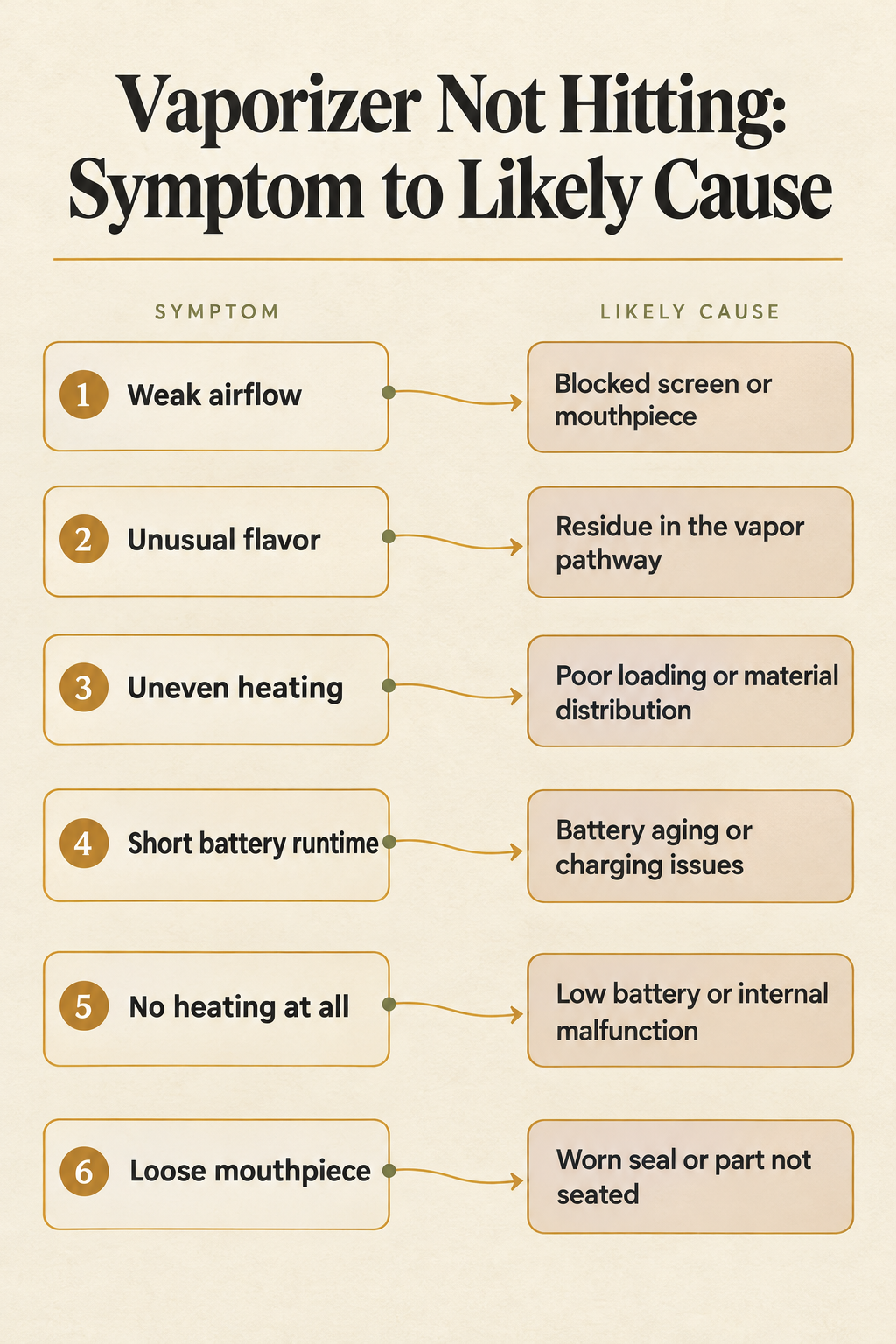
Airflow comes next. AirVape maps weak airflow to a blocked screen or mouthpiece, and unusual flavor to residue in the vapor pathway [5]. If the part that heats is the suspect, What Is a Vape Atomizer, and When Should You Replace It? explains what an atomizer does and when replacement makes more sense than more cleaning. If the device heats properly and the draw feels normal but vapor is thin, temperature is the next variable, and What Temperature Should You Set a Vaporizer To? covers what the settings actually change on different devices.
If the material is burning unevenly rather than failing to vaporize, that is a different problem with a different cause, and Why Does My Joint Burn Unevenly and How Do You Fix It? covers it for rolled material.
- Confirm the battery and the charging contacts. A fully drained unit will not operate, and PAX advises pressing down on the charging contacts and using a source rated for at least 1.5A [2].
- Clear the mouthpiece and the screen. A blocked screen or mouthpiece is the first thing AirVape lists for weak airflow [5].
- Check that no vent or air inlet is covered. Storz & Bickel specifically warns against blocking the air vents during use or cooldown [4].
- Check the load and the grind. Overfilling, underfilling, and a powder-fine grind can each change how air moves through the chamber.
- Correct the draw. A short, even inhale is the instruction both PAX and Storz & Bickel publish, and pulling harder does not add vapor.
- Confirm the temperature setting. Use the setting range from your device’s manual rather than a number copied from another brand.
- Stop and contact the manufacturer if a fault condition appears, such as a displayed error, unexpected overheating, a burning electrical smell, or physical battery damage [5].
Can the Way You Pack the Chamber Cause a Weak Draw?
Loading advice is where manufacturers disagree most, because each one is describing its own chamber. PAX asks for material broken to a medium-coarse consistency, loaded to fill the oven completely, tamped firmly, filled again, and tamped again so the oven sits packed to the brim [1]. The same guidance offers a Half Pack Oven Lid for shorter sessions, which is the manufacturer’s own answer for anyone who does not want a full oven.
AirVape warns from the other direction. Filling a chamber beyond its intended capacity can restrict airflow and make cleaning harder, and material should be loaded according to the manufacturer’s recommendations [5]. Both companies do agree that grind matters. PAX wants material that is not too fine and is free of large chunks. AirVape advises against grinding material into a powder-like consistency, because fine particles can pass into screens and airflow passages and add to clogging.
The two positions are not really in conflict. PAX is describing a chamber designed to be filled and tamped, and it sells a smaller lid for anyone who wants less. AirVape is warning about a chamber with a stated capacity that should not be exceeded. Applying one company’s packing method to the other company’s chamber can create the exact problem you are trying to solve, in either direction: too much material compresses the path, and too little contact between material and the heated walls leaves the device with little to work on.
Start from your manual, then change one variable at a time. Adjust the pack or the grind, run a single session, and note what actually changed before you adjust anything else.
- Material preparation, PAX: break material to a medium-coarse consistency, free of large chunks and not too fine [1].
- Material preparation, AirVape: avoid a powder-like grind, because fine particles reach screens and airflow passages and contribute to clogging [5].
- Fill level, PAX: fill the oven completely, then top it up after tamping so it sits packed to the brim.
- Fill level, AirVape: stay within the chamber’s intended capacity, since overfilling can restrict airflow and make cleaning harder.
- Tamping, PAX: tamp firmly, fill again, and tamp again. AirVape publishes no tamping step, so follow your own manual instead.
- Session size, PAX: a Half Pack Oven Lid suits shorter sessions. Check whether your device has an equivalent accessory before loading a partial chamber by guesswork.
- Airflow consequence, both: a compressed overfill and a powder-fine load can each reduce airflow, from opposite directions.
| Loading detail | PAX oven guidance | AirVape chamber guidance |
|---|---|---|
| Material preparation | Medium-coarse, not too fine, no large chunks | Avoid a powder-like grind that reaches screens and passages |
| Fill level | Fill completely, then top up after tamping | Stay within the chamber’s intended capacity |
| Tamping | Tamp firmly, fill again, tamp again | No tamping step published; follow your own manual |
| Shorter session | Use a Half Pack Oven Lid | Load per the manufacturer’s recommendations |
| Main airflow risk | A grind that is too fine or too chunky | Overfilling that restricts airflow and complicates cleaning |
Are You Drawing Too Hard for the Vaporizer to Keep Up?
Draw technique is the cause most owners never consider, and it costs nothing to change. PAX’s instruction is blunt: sip it, don’t rip it. The company asks for a draw of about three seconds and states plainly that drawing harder or longer will not create more vapor [1].
Storz & Bickel gives the same idea in different language. It asks for an even inhale over a few seconds at roughly half the volume the user could actually take in [4]. That is a smaller breath than most people take by default, which is why the correction feels strange the first time. The same support page also warns against blocking or covering the air vents during use or cooldown, since a covered vent turns good technique into a starved one.
Practice the draw on a clean device with a known-good load. If vapor improves when you pull gently and drops when you pull hard, the device was never the problem. If nothing changes either way, move on to the airflow tests in the next sections rather than practicing harder.
- Start with the device fully warmed and the chamber loaded the way your manual describes.
- Take an even, gentle inhale instead of a hard pull, which is the Storz & Bickel instruction [4].
- Keep the draw short. PAX puts it at about three seconds [1].
- Aim for roughly half the volume you could actually inhale, rather than filling your lungs.
- Keep your fingers off the air vents and the air inlet for the whole draw.
- When vapor drops off mid-session, repeat the same gentle draw instead of pulling harder or longer.
Why Does Your Vaporizer Keep Shutting Off in the Middle of a Session?
A device that switches itself off mid-session is usually following its own timer, not failing. Storz & Bickel’s MIGHTY series has an automatic shutdown, and its support page notes that weak draws may not be detected as activity, while pressing any button resets the shutdown timer [4]. That detail matters, because a gentle draw is exactly the kind of session a device sensor can miss.
Arizer makes the same behavior adjustable. The Solo II shut-off window runs from five to fifteen minutes and defaults to ten, so a short window can look like a mid-session failure on a device that is working normally [6]. The company also states that the unit will not operate if the battery is completely drained, and that a five to ten minute partial charge allows use while charging.
Battery condition compounds the confusion. Arizer lists roughly three hours of use per charge and about three hours to fully charge, and notes that batteries last hundreds of charge cycles before losing capacity, with drops able to reduce capacity quickly [6]. A cell that no longer holds a full session will cut out early, and the symptom looks identical to a timer. Charging hardware is the other half of that picture, since PAX recommends a source rated for at least 1.5A rather than a low-power wall adapter [2].
- Automatic shut-off timer: the MIGHTY series shuts down on its own, and a weak draw may not register as activity [4].
- Adjustable shut-off window: the Solo II allows five to fifteen minutes with a ten minute default, so a short setting can look like a fault [6].
- A fully drained battery: the unit will not operate at all until it has some charge [6].
- An aging battery: capacity falls over hundreds of charge cycles, and a worn cell can end a session early [6].
- A charging source that cannot supply enough current: PAX recommends at least 1.5A, since a weak adapter may not supply enough power [2].
- A button press: on the MIGHTY series, pressing any button resets the timer, which is the fastest way to tell a timer apart from a fault [4].
Is the Vapor Path Clogged, or Is the Heater Actually Dead?
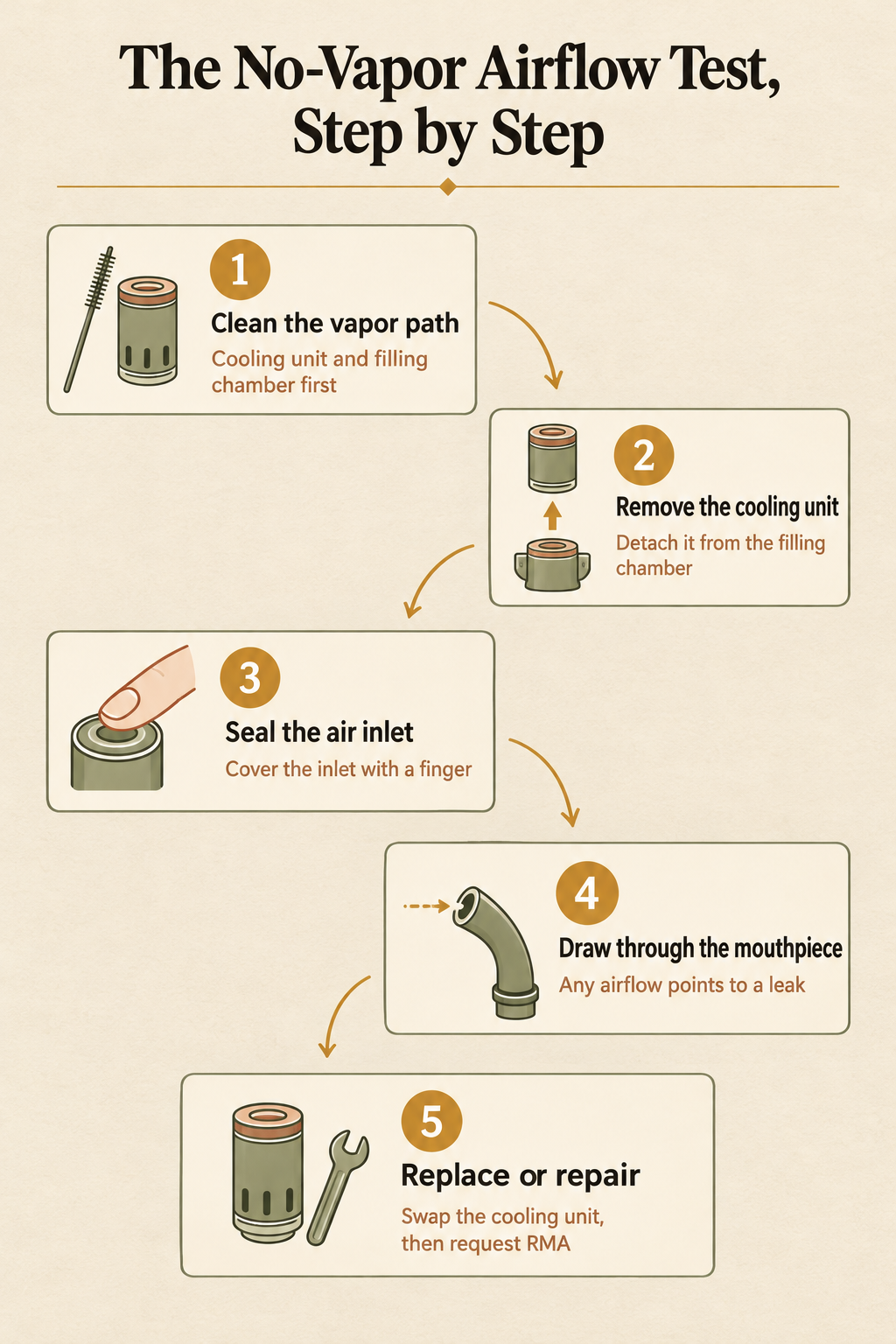
This is the fork that decides whether you clean, replace, or file a repair request. Storz & Bickel publishes a concrete no-vapor procedure: clean the cooling unit and filling chamber as the manual describes, remove the cooling unit, cover the air inlet with a finger, and inhale through the mouthpiece. If airflow still exists, the cooling unit may be leaking and should be replaced. If the problem persists after that, the manufacturer directs the owner to an RMA repair [4].
Arizer offers a measurable version of the same test for desktop balloon filling. If filling the bag takes longer than two to three minutes, it may be time to clean or replace parts such as the dome screen and the balloon [7]. That unit also has Low, Medium, High, and Off fan settings, so fan position belongs on the checklist before you blame a part.
Clean before you conclude anything. AirVape’s cautions are worth following closely here: switch off and disconnect before cleaning, let the chamber cool completely, avoid liquids in a warm chamber, do not scrape with metal tools, do not force components apart, and keep moisture away from charging ports, buttons, and electronics [5]. A part damaged by aggressive cleaning will fail the airflow test in a way that looks like a dead heater.
Interpret the result honestly. Airflow that continues with the inlet sealed points at a leak somewhere in the vapor path. No airflow at all, on a device that still heats, points at a blockage or a part that no longer passes air. No heat at all is a different problem, and the error codes in the next section are where that one belongs.
- Clean the vapor path first, following your manual, and let every part cool before you touch it [5].
- Remove the cooling unit from the filling chamber, if your device uses that design [4].
- Cover the air inlet with a finger so no outside air can enter the device.
- Draw through the mouthpiece and pay attention to whether any air moves.
- If air still moves with the inlet sealed, the cooling unit may be leaking and should be replaced [4].
- If the test still fails with a replacement part, contact the manufacturer about an RMA repair rather than taking the device apart [4].
- On a desktop balloon unit, time the fill: longer than two to three minutes points to the dome screen or the balloon [7].
What Do Error Lights and No Atomizer Messages Actually Mean?
Once a device starts talking in flashes and messages, the symptom is specific enough to act on without guesswork. Puffco decodes its own Peak Pro signals. Three white flashes mean the chamber is not attached. A red and white flash pattern indicates a chamber connection error, which the company addresses by removing and cleaning the chamber, soaking it in isopropyl alcohol of 90 percent or higher for 20 minutes with no water, letting it air dry completely, and reattaching it. A solid red light held for five seconds that blocks a heat cycle means the device is overheating and should be left to cool [8].
Tank and pod devices use words instead of lights. Innokin explains that no atomizer or check atomizer means the device cannot read the installed coil’s resistance, or that the resistance falls outside the expected range. Its process of elimination is to try a different tank or pod, which separates an attachment fault from a device fault, then charge the battery, clean the metal contact points, and check for leaks [9].
Some signals are a stop sign rather than a step. AirVape lists four conditions that should end troubleshooting and go to the manufacturer: a displayed error, unexpected overheating, a burning electrical smell, or physical battery damage [5]. Those are final. Nothing in this guide should be used to keep running a device that shows any of them.
- Three white flashes on a Peak Pro: the chamber is not attached. Reseat it before anything else [8].
- Red and white flashing on a Peak Pro: chamber connection error. Remove and clean the chamber, soak it in 90 percent or higher isopropyl alcohol for 20 minutes with no water, air dry it fully, and reattach [8].
- A solid red light held for five seconds on a Peak Pro: the device is overheating and will not start a heat cycle. Let it cool [8].
- No atomizer or check atomizer on a tank or pod device: the coil resistance cannot be read or sits outside the expected range [9].
- A rainbow response with flooding on a Peak Pro: the chamber needs a thorough clean, which Puffco also suggests each time the battery is fully depleted [8].
- A displayed error, unexpected overheating, a burning electrical smell, or physical battery damage: stop troubleshooting and contact the manufacturer [5].
- To isolate an attachment fault, swap in a different tank or pod. If the replacement reads correctly, the fault sits in the original attachment, not in the battery [9].
When Does a Part Need Cleaning and When Does It Need Replacing?
Cleaning and replacing solve different problems, and mistaking one for the other is how owners end up scrubbing a part that will never seal again. AirVape draws the line clearly: a screen that stays obstructed, or a seal that no longer fits, may need replacement rather than more scrubbing. A loose mouthpiece usually points to a worn seal or a part that is not seated correctly [5].
Its cleaning cautions explain why aggressive cleaning backfires. Switch off and disconnect first, let the chamber cool completely, avoid introducing liquids into a warm chamber, do not scrape with metal tools or force components apart, and keep moisture away from charging ports, buttons, and electronics [5]. Those rules exist because the parts that airflow depends on are the ones that moisture and force damage first.
Some replacements are scheduled rather than reactive. Arizer recommends replacing the XQ2 air filter cartridge every four to six months [7]. Puffco suggests a thorough clean each time the battery is fully depleted, and notes that a fully charged Peak Pro lasts about 30 heating cycles, with Sesh Mode using the battery faster [8]. A cooling unit that fails the sealed-inlet test is a replacement item, not a cleaning item [4]. Keep a spare screen and seal on hand and most of these decisions stop being urgent.
- A screen that stays obstructed after a proper clean: replace the screen rather than scrubbing harder [5].
- A seal that no longer seats or no longer fits: replace the seal, since airflow will keep leaking past it [5].
- A loose mouthpiece: check the seal and whether the part is seated correctly before buying anything [5].
- A cooling unit that still passes air with the inlet sealed: replace it, because that result points to a leak [4].
- A flooded chamber: clean it thoroughly, since Puffco ties flooding and a rainbow response to a chamber that needs cleaning [8].
- A balloon or dome screen on a desktop unit: clean first, then replace if a bag still takes longer than two to three minutes to fill [7].
- An XQ2 air filter cartridge: replace it every four to six months on Arizer’s recommendation [7].
Frequently Asked Questions
Why does my vaporizer turn on and heat up but produce no vapor?
A device that heats but produces nothing is usually failing on one of the variables PAX lists for vapor amount: material moisture, how much was loaded, how it was prepared and packed, the temperature setting, and how the user draws [1]. Work through those before assuming a hardware fault. If the chamber is loaded correctly and the draw is gentle and short, run the manufacturer’s airflow test: clean the vapor path, remove the cooling unit, cover the air inlet with a finger, and inhale through the mouthpiece. Airflow that continues means the cooling unit may be leaking and needs replacing rather than more cleaning [4].
How full should a dry herb chamber be packed?
It depends on the device, and the manual decides. PAX asks for material broken to a medium-coarse consistency and packed to the brim: fill the oven, tamp firmly, fill again, and tamp again, with a Half Pack Oven Lid available for shorter sessions [1]. AirVape warns that filling a chamber past its intended capacity can restrict airflow and make cleaning harder, and says material should be loaded per the manufacturer’s recommendations [5]. Grind matters in both cases, since a powder-fine consistency sends particles into screens and airflow passages and contributes to clogging.
Why does my vaporizer shut off while I am still drawing?
Automatic shut-off is the usual answer. Storz & Bickel’s MIGHTY series shuts down automatically, and its support page notes that weak draws may not be detected as activity, while pressing any button resets the timer [4]. Arizer’s Solo II makes the window adjustable between five and fifteen minutes with a ten minute default [6]. Battery state matters too: a completely drained unit will not operate, while a partial charge of five to ten minutes allows use while charging.
What does no atomizer or check atomizer mean on a vape?
Innokin explains that the message means the device cannot read the installed coil’s resistance, or that the resistance falls outside the expected range [9]. Its process of elimination is to try a different tank or pod first, which separates an attachment fault from a device fault, then charge the battery, clean the metal contact points, and check for leaks. If a swapped tank reads correctly, the problem sits in the original attachment rather than in the battery or the device.
When should I stop troubleshooting and contact the manufacturer?
AirVape lists four conditions that should end troubleshooting: a displayed error, unexpected overheating, a burning electrical smell, or physical battery damage [5]. Puffco’s light codes point the same way, since a solid red light held for five seconds that blocks a heat cycle means the device is overheating and should be left to cool [8]. For a failed airflow test that persists after cleaning, Storz & Bickel directs owners to an RMA repair rather than further disassembly [4].
What Should You Do the Next Time Your Vaporizer Stops Hitting?
Run the same short sequence every time: name the part, confirm power and contacts, clear the airflow, check the load and grind, correct the draw, confirm the temperature, and read the error signals last. That order keeps you on the cheap fixes first and stops you from replacing a device that only needed a screen or a firm tamp.
Two habits make the sequence faster in practice. Keep one spare screen and one spare seal for your device, since those two parts cause an outsized share of weak draws. And write down what your device was doing before it failed, because a timer, a drained battery, and a leaking cooling unit all feel identical until you check which one the evidence supports.
If the part you need is a consumable rather than a repair, screens, seals, mouthpieces, pods, and cooling units are the usual candidates, and Treehouse Lifestyle offers free shipping on orders $150+ when you are stocking up on spares. If the airflow test fails with a replacement part in place, stop and contact the manufacturer. That is what their repair process is for, and no amount of further disassembly improves on it.
Sources
- PAX: Vapor Production Tips for PAX
- PAX: My PAX is not lighting up on the charger or is not fully charging
- PAX: My Pod is Clogged
- Storz & Bickel: Operation
- AirVape: Dry Herb Vaporizer Maintenance, How to Keep Your Device Performing Better
- Arizer: Solo II Support – Troubleshooting & Assistance
- Arizer: Arizer XQ2 Support
- Puffco: Peak Pro 3DXL Support, Settings & Help
- Innokin: Why Does My Vape Say No Atomizer?